Best AI Tools for Elementary Students in 2026 (Safe & Teacher-Approved)
This guide is different from most “AI tools for elementary school” lists — it is written for parents and students, not teachers. Every tool below is one your child could actually use directly, not something that only runs behind the scenes in a teacher’s lesson planning.
For each tool, I have noted whether a student uses it hands-on, how much supervision it needs, and whether it is genuinely free for families or depends on a school account. If you are a teacher looking for classroom prep tools instead, our free AI tools for elementary teachers guide covers that separately.
One thing worth saying upfront: most general-purpose AI chatbots, including ChatGPT, require users to be at least 13 under their own terms of service. None of the tools recommended here have that restriction for supervised classroom or family use — that is part of why they made this list.
Why “Safe for Kids” Actually Matters Here
Elementary students are not a smaller version of a teenage or adult AI user. A 7-year-old asking an AI chatbot a question needs guardrails a high schooler does not: no open-ended chat with a stranger-shaped interface, no exposure to inappropriate content, and ideally an adult who can see what was actually typed.
That is the filter used for this list. Every tool below either keeps the AI inside one narrow, teacher-set topic, gives an adult visibility into the conversation, or has the student doing hands-on creative work rather than open conversation. None of them are a general-purpose chatbot handed to a child with no boundaries.
If your child’s school has not shared an AI use policy, it is worth asking one specific question: can a teacher or parent see what my child actually typed to the AI? For every tool on this page, the honest answer is yes.
MagicSchool AI
MagicSchool AI is mainly a teacher tool, but it has a student-facing side called MagicStudent that is actually built for direct use — a teacher sets up structured activities and invites the class in, rather than handing students an open chatbot.
What makes it useful:
- MagicStudent activities are teacher-built and structured, not open-ended chat
- Recommended for grade 3 and up — younger students may need more support
- The rest of the platform (lesson plans, translated letters home, report card comments) runs entirely behind the scenes for teacher prep
Access: Free plan available for teachers; student access depends on how the teacher sets up MagicStudent.
Also read our full MagicSchool AI Review to learn more.
SchoolAI
SchoolAI’s “Spaces” are the closest thing on this list to a child safely chatting with AI. A teacher builds a Space around one topic — a math concept, a reading passage, a writing prompt — and students type into a chat window that only responds within that guardrail.
What makes it different from handing a child an open chatbot:
- Every student message is visible to the teacher in real time through Mission Control
- The AI stays inside the one lesson topic the teacher set up — it does not wander
- No open internet search, and no separate student account required in most setups
- Free plan includes 3 Spaces, enough for a teacher to try it with one class
Access: Free plan available; paid plans add more Spaces and district features.
Also read our full SchoolAI Review to learn more.
Curipod
Curipod is built around students actively responding, not just watching. A teacher starts an AI-generated lesson — a poll, a drawing prompt, an open response question — and every student joins from their own device and answers in real time.
Why elementary teachers like it:
- Young students who freeze up raising a hand can answer privately on a screen instead
- Results often show up anonymously, which lowers the pressure to give a “perfect” answer
- Every student participates, not just the two or three who usually raise their hands
- Students join with a class code — no account or email needed
Access: Free plan covers the core interactive lesson features.
Also read our full Curipod Review to learn more.
Canva for Education
Canva for Education is one of the few tools on this list where an elementary student genuinely does the clicking — not just receiving something a teacher made for them. Once a teacher sets up a class and invites students, kids can build their own posters, slideshows, and simple design projects using templates built for their age group.
What makes it work for young students:
- Drag-and-drop — no typing prompts or reading long instructions required
- Thousands of templates built specifically for school projects
- Students can present, print, or share what they made
- Free for eligible K-12 students, not just their teachers
Access: Free for students at eligible K-12 schools, through a teacher invitation.
Also read our full Canva for Education Review to learn more.
Khanmigo
Khanmigo is Khan Academy’s AI tutor, and it is the tool on this list built most directly for a student to use one-on-one. Instead of handing over the answer, it asks guiding questions — closer to how a patient tutor works through a problem than a search engine.
Why it is considered safer for kids than a general chatbot:
- It will not just give the answer — it walks through the problem with the student
- Conversations stay inside the subject the student is actually working on
- Built specifically for K-12 use from the start, not an adult chatbot adapted for school
- Costs $4/month for student access and works best with readers who can work independently
Access: Free for eligible US teachers; student access is $4/month, so check with your child’s school about availability first.
Also read our full Khanmigo Review to learn more.
Quick Comparison Table
Tool | Best For | Student Uses It Directly? |
|---|---|---|
Khanmigo | One-on-one AI tutoring | ✓ Yes |
Curipod | Interactive class participation | ✓ Yes, in class |
SchoolAI | Supervised AI chat practice | ✓ Yes, in class |
Canva for Education | Student-made projects | ✓ Yes |
MagicSchool AI | Behind-the-scenes teacher prep | ⚠ Only via MagicStudent |
Which of These Tools Can Elementary Students Use in Class?
Most “AI tools for kids” lists quietly assume every tool works the same way for a child as it does for an adult. It does not. A tool a teacher uses at their own desk is a very different thing from a tool a 7-year-old opens themselves. Here is the honest split, tool by tool.
Tool | Student uses it directly? | Age suitability | Notes |
|---|---|---|---|
MagicSchool AI | ✓ Yes, via MagicStudent | Grade 3+ | Teacher invites students; structured activities only |
SchoolAI | ✓ Yes, via Spaces | All grades | Teacher-built Spaces only; every message visible to the teacher |
Canva for Education | ✓ Yes | Grade 1+ | Teacher creates accounts; age-appropriate filters on |
Khanmigo | ✓ Yes | Grade 3+ | $4/month for student access; needs independent reading |
Curipod | ✓ Yes | All grades | Join by code, no account; drawing activities suit K-2 |
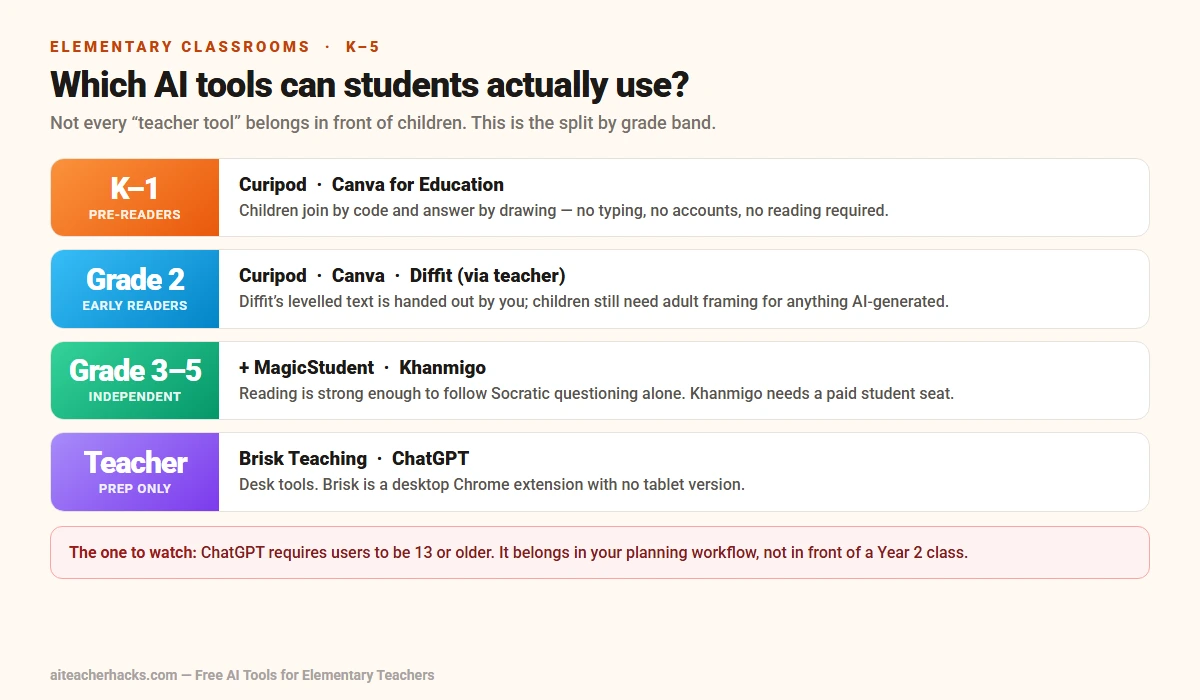
The short version: if you want your child interacting with AI directly, Curipod is the most accessible starting point — no accounts, no age gate, and drawing-based activities that work before a child can type. Canva for Education is the next most usable from Grade 1. Khanmigo is the strongest academic tutor of the group but needs a paid student subscription and a reader who can work independently. SchoolAI sits in between — genuinely interactive, but only inside topics a teacher has built.
ChatGPT is the one to be careful with. Its terms require users to be 13 or older, so it does not belong in front of a Year 2 class — or in your child’s hands at all without adult supervision.
Tips for Parents Before Your Child Uses Any AI Tool
Ask what your child’s school actually allows. Policies vary a lot between districts and even between teachers. Start with a direct question: which AI tools, if any, does my child use in class?
Check who can see the conversation. For any tool your child uses, ask whether a teacher (or you) can review what was typed. Every tool in this guide answers yes.
Treat AI output like a rough draft, not a fact. AI tutors and lesson tools can still get things wrong. Encourage your child to double-check surprising answers with a teacher or a book, the same way you would with anything online.
Keep general-purpose chatbots off-limits for now. Tools like ChatGPT are built for adults and require users to be 13 or older under their own terms. If your elementary-age child wants to “ask the AI” something, one of the tools above is the safer starting point.
Conclusion
The best AI tools for elementary students in 2026 are the ones built specifically for young learners — not a general chatbot handed over with no guardrails. Start with Curipod if you want your child interacting with AI in class starting now, or Khanmigo if one-on-one tutoring is the goal.
You do not need all five. Ask your child’s teacher which of these (if any) they already use, and go from there.
Also check out our guide on the best free AI tools for elementary teachers if you are the one doing the teaching.
Frequently Asked Questions
Yes, when the tool is built for classroom use and a teacher can see what the student typed. Every tool in this guide keeps students inside a teacher-set topic or has a teacher monitoring the conversation — none of them are an open chatbot handed to a child.
ChatGPT’s own terms require users to be 13 or older, so it is not appropriate for direct elementary use. The tools in this guide (Khanmigo, Curipod, SchoolAI, Canva for Education) are built specifically for K-12 students instead.
Curipod is the most accessible starting point — students join with a class code on any device and can respond with drawings instead of typing, which works before a child can read or write independently.
Usually no. Curipod and SchoolAI students typically join a teacher-created session with a code, not a personal account. Canva for Education and Khanmigo do require the school or teacher to set up student access.
For the tools in this guide, yes — SchoolAI shows teachers every message in real time, and the other tools keep interactions inside a structured, teacher-visible activity rather than a private open chat.
Curipod, for most kindergarten and first-grade kids — it does not require reading or typing, so children can respond with taps or drawings. Khanmigo works best once a child can read independently, usually grade 3 and up.
Most do not. Curipod, SchoolAI, and MagicSchool’s MagicStudent are free through the school at no cost to parents, and Canva for Education is free for eligible students. Khanmigo is the exception — student access costs $4/month.