This guide covers free AI tools chosen specifically for elementary classrooms — tools that work with young learners, are appropriate for K–5 use, and do not need technical skill to get started.
Every tool here has a free plan that covers real classroom needs. Some are for teacher preparation only. Others can be used directly with students in class, and I have noted which is which for each one.
If you teach middle or high school, or want a broader comparison across all grade levels, the full AI tools for teachers guide is the better starting point. This page stays focused on what actually works in a K–5 room.
Looking for tools your students can use themselves, not just teacher prep tools? See our AI tools for elementary students guide for kid-safe picks parents and teachers can trust.
Why Elementary Teachers Need AI Tools in 2026
AI tools can take over a meaningful share of the repetitive preparation work — lesson planning, differentiating materials, writing parent emails, building assessments — which is time you get back for teaching. For elementary teachers especially, those hours are precious. Whether you are differentiating reading materials for mixed-ability classrooms, writing parent emails, or creating fun activities — AI can handle the repetitive work so you can focus on your students.
Let’s dive in.
MagicSchool AI
MagicSchool AI is a strong option for elementary teachers. It is built specifically for teachers, with classroom-friendly language and no tech jargon. The free version is genuinely useful for writing parent emails, building exit tickets, rubrics, and much more.
Best elementary features:
- Lesson plan generator aligned to grade-level standards
- Text Leveler — instantly simplifies any text for young readers
- Report card comment generator
- Parent email writer
- Behavior intervention plan creator
Pricing: Free plan available — no credit card needed
Also read our full MagicSchool AI Review to learn more.
At elementary level: the Text Leveler is the tool you will reach for most. In a single K–5 class the reading gap is often three grade levels or more, and levelling one passage five ways by hand is the job that eats a Sunday.
Diffit
Diffit is a hidden gem for elementary teachers. Paste any text, article, or topic, and Diffit instantly rewrites it at the reading level you choose — from kindergarten all the way up. It also generates comprehension questions, vocabulary lists, and translated versions automatically.
Diffit automatically adjusts the reading level for different student groups and can generate comprehension questions, vocabulary lists, and translated versions — all from one source text.
Best elementary features:
- Adjust any text to K-2, 3-4, or 5-6 reading levels
- Auto-generate comprehension questions
- Vocabulary list builder
- Translate materials into 30+ languages for ESL students
Pricing: Free plan available
At elementary level: Diffit is one of the few tools whose simplified output is genuinely decodable rather than merely shorter. In K–2 a short sentence full of unfamiliar graphemes is no easier than a long one.
Brisk Teaching
Brisk Teaching is a free Chrome extension that works directly inside Google Docs, Slides, and Google Classroom. It works inside the tools teachers already use every day — no new tab, no new login required.
Best elementary features:
- Turn any YouTube video or article into a quiz instantly
- Give writing feedback directly inside Google Docs
- Create lesson plans from any online resource
- Generate Google Slides presentations automatically
Pricing: Free plan available
At elementary level: desktop and laptop only — there is no tablet version. If your room runs on iPads, Brisk stays a teacher-side tool.
Canva for Education
Canva for Education is completely free for teachers and students. It is perfect for creating colorful worksheets, classroom posters, presentations, and learning materials that elementary students actually enjoy looking at.
Canva for Education includes AI-powered design tools for creating presentations, worksheets, infographics, and classroom displays, with age-appropriate content filters for students.
Best elementary features:
- Thousands of classroom-ready templates
- AI image generator for custom visuals
- Student accounts with safe content filters
- Works on any device including tablets
Pricing: 100% free for K-12 teachers and students
At elementary level: the drawing canvas works well with a stylus, which suits tablet-heavy primary classrooms. Children can make something visual without typing a word.
Khanmigo
Khanmigo is Khan Academy’s AI-powered teaching assistant. Over 6 million teachers globally have turned to Khan Academy for world-class teaching tools, and Khanmigo generates high-quality progress reports and classroom activities that build on teacher expertise.
Best elementary features:
- Standards-aligned lesson hooks and activities
- Generates multilingual family emails
- Creates grading rubrics and problem sets
- Student progress tracking dashboard
Pricing: Free for K-12 educators
Elementary reality check: the teacher account is free, but student access is $4/month — it is not free for students. In practice Khanmigo works from around Grade 3 upward, where children can read well enough to follow its questioning independently. Kindergarten and Grade 1 will need an adult sitting with them.
Curipod
Curipod turns your lesson ideas into interactive slides with built-in student engagement activities. It is perfect for when your students need more than just another slide deck — Curipod makes differentiation easy and keeps young learners engaged.
Best elementary features:
- AI generates interactive lesson slides instantly
- Built-in polls, word clouds, and drawing activities
- Works on any student device
- Students join with a simple code — no accounts needed
Pricing: Free plan available
At elementary level: the drawing slides are what earn it a place in K–3. Children answer by drawing, so the activity does not quietly exclude everyone who cannot yet find the letters on a keyboard.
ChatGPT
ChatGPT is not designed specifically for teachers, but it is incredibly powerful for elementary lesson planning, creating worksheets, writing parent communications, and much more. ChatGPT is the most versatile AI tool for teachers — not for direct student use, but for teacher preparation including lesson plans, differentiated worksheets, discussion questions, and parent communication.
Best elementary uses:
- Write complete lesson plans in minutes
- Create age-appropriate stories and reading passages
- Generate fun math word problems
- Write parent newsletter drafts
Check out our full guide on how to use ChatGPT to write lesson plans for step-by-step instructions.
Pricing: Free plan available at chat.openai.com
At elementary level: not for direct student use. ChatGPT requires users to be 13 or older, so treat it as a preparation tool rather than something you put in front of the class.
Quick Comparison Table
Tool | Best For | Free Plan |
|---|---|---|
MagicSchool AI | All-in-one teacher tools | ✓ Yes |
Diffit | Differentiating reading levels | ✓ Yes |
Brisk Teaching | Google Classroom integration | ✓ Yes |
Canva for Education | Visual materials & design | ✓ Yes |
Khanmigo | Student tutoring & progress | ✓ Yes |
Curipod | Interactive lessons | ✓ Yes |
ChatGPT | Lesson planning & writing | ✓ Yes |
Which of These Tools Can Elementary Students Use in Class?
Most “AI tools for teachers” lists quietly assume the teacher is the only one touching the tool. In an elementary room that distinction matters a great deal — a tool you can use at your desk is a very different thing from a tool thirty seven-year-olds can open. Here is the honest split.
Tool | Students use it directly? | Age suitability | Notes |
|---|---|---|---|
MagicSchool AI | ✓ Yes, via MagicStudent | Grade 3+ | Teacher invites students; structured activities only |
Diffit | ⚠ Indirectly | All grades | Teacher generates levelled text; students receive the output |
Brisk Teaching | ✗ No | Teacher only | Desktop Chrome extension, no tablet version |
Canva for Education | ✓ Yes | Grade 1+ | Teacher creates accounts; age-appropriate filters on |
Khanmigo | ✓ Yes | Grade 3+ | $4/month for student access; needs independent reading |
Curipod | ✓ Yes | All grades | Join by code, no account; drawing activities suit K–2 |
ChatGPT | ✗ No | 13+ only | Age restriction — teacher preparation tool only |
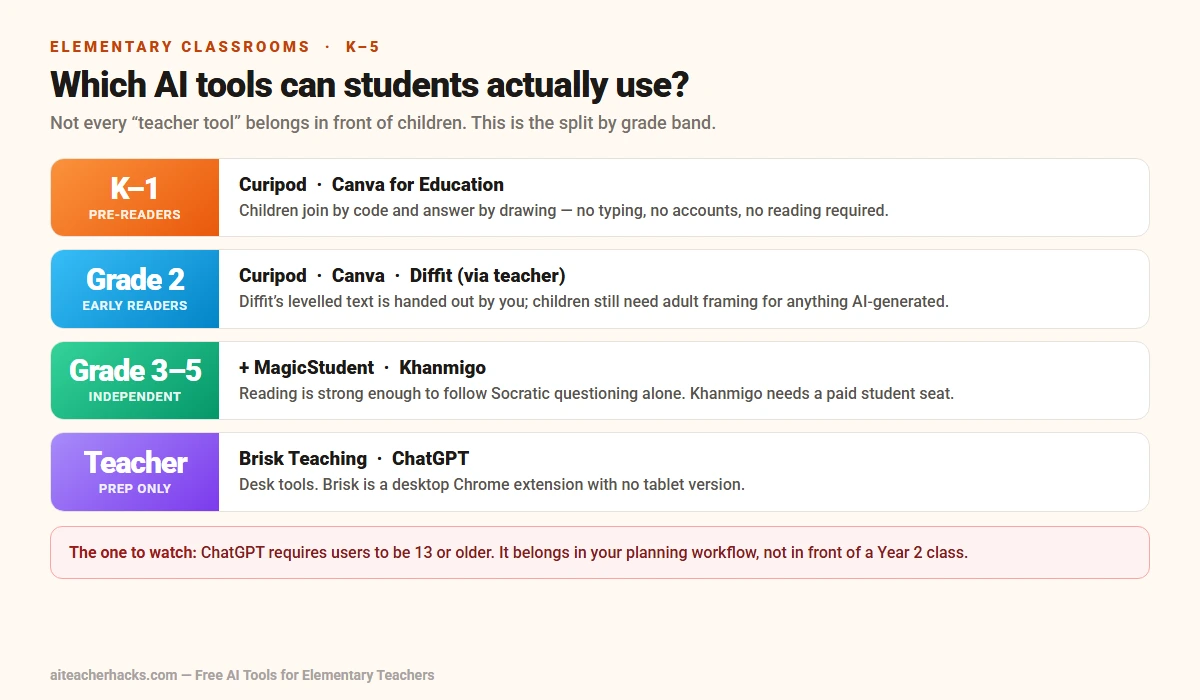
The short version: if you want children interacting with AI directly during a lesson, Curipod is the most accessible starting point — no accounts, no age gate, and drawing-based activities that work before children can type. Canva for Education is the next most usable from Grade 1. Khanmigo is the strongest academic tutor of the group but needs a paid student subscription and readers who can work independently.
ChatGPT is the one to be careful with. Its terms require users to be 13 or older, so it belongs in your preparation workflow rather than in front of a Year 2 class.
Tips for Using AI Tools in Elementary Classrooms
Start with one tool. Do not try all 7 at once. Pick one tool that solves your biggest weekly problem and master it first.
Always review AI output. AI tools are helpers, not replacements. Always check generated content for accuracy and age-appropriateness before using it with students.
Use AI for prep, not instruction. The best use of AI for elementary teachers is behind the scenes — planning, creating materials, and writing communications — not replacing direct teaching time.
Check privacy settings. Always ensure any tool you use with students adheres to FERPA and state privacy laws to protect student information. All tools on this list meet these standards.
Conclusion
The best free AI tools for elementary school teachers in 2026 can genuinely save you hours every single week. Start with MagicSchool AI if you want one tool that does everything. Add Diffit if differentiation is your biggest challenge. Install Brisk if you live inside Google Classroom.
You do not need to use all of them. Just pick one, try it this week, and see the difference it makes in your classroom.
Also check out our guide on the best AI tools for teachers in 2026 for more options beyond the free tier.
Frequently Asked Questions
Yes — all 7 tools listed in this guide have genuinely free plans that are useful for elementary teachers without any hidden fees.
MagicSchool AI and Canva for Education are the most practical starting points. MagicSchool handles lesson planning and parent emails with no setup to speak of, and Canva gives you visual templates for worksheets and displays that work with pre-readers.
Curipod is worth adding once you want the children involved: they join with a code on any device and can answer by drawing, so it works before typing is established.
No. All tools on this list are designed to be beginner-friendly. Most teachers get up and running within 5–10 minutes.
By Grade 3 the whole list becomes usable. Diffit earns its place in mixed-ability rooms, where the reading gap between children in the same class is often several years. Khanmigo becomes viable here too, because children can follow its questioning without an adult reading it to them. MagicSchool’s student side works from Grade 3 upward.
Curipod and Canva for Education are free for both. MagicSchool’s student platform is free when a teacher invites the class. Diffit is a teacher tool — children receive what it produces rather than using it themselves. Khanmigo is the exception: free for teachers, but student access is a paid subscription.