Kahoot AI Features 2026: Quiz Generator, Pricing & What’s Free
Yes, Kahoot now uses AI. Its AI features can help teachers generate quiz questions, create learning content, and speed up some of the work that normally goes into building a Kahoot.
The bigger question is whether these features are actually useful — and which ones you can use without paying.
In this guide, I’ll walk through Kahoot’s AI features in 2026, including the AI question generator, what’s available for free, how the paid plans differ, and where Kahoot AI is genuinely helpful in the classroom. I’ll also point out where I think you’re better off doing things the old-fashioned way or using another tool.
Table of Contents
Does Kahoot Use AI?
Yes. Kahoot now includes AI-powered features that help teachers create and adapt quiz content more quickly. The most useful example is its AI question generator, which can turn a topic or source material into a set of questions that you can review and edit before using with students.
Kahoot is still primarily a classroom quiz and engagement platform, though. The AI features are there to speed up content creation rather than replace the parts teachers already use Kahoot for, such as live quizzes, polls, and formative assessment.
Learn how to create your first Kahoot! game in this quick tutorial. Watch the video
Kahoot AI Features — What They Actually Do
1. AI Quiz Generator from Any Topic or URL
In seconds, AI can turn any topic, URL, or Wikipedia article into a ready-to-play Kahoot or effortlessly transform your existing files and slides into interactive games.
This is the most useful AI feature for teachers. Instead of building quiz questions manually one by one, you paste a topic or upload a document and Kahoot generates a full quiz. You can paste a topic or upload content and the AI generates a set of questions for you — a genuine time-saver for teachers who need to create quizzes quickly.
Honest take: This works well for factual, multiple-choice content. It struggles with higher-order thinking questions and nuanced topics. Always review and edit AI-generated questions before running them with students — some outputs are too easy, too vague, or factually imprecise.
2. Kahoot AI Assistan
Kahoot also has an AI Assistant built directly into the Kahoot creator. Instead of generating an entire game from scratch, you can use it while editing a question or slide.
The assistant can help complete questions, suggest answer options, improve slides, and generate follow-up content based on the context of your Kahoot.
This is useful when you already have a quiz started but get stuck on a question or want to make an activity more complete.
This is more useful than it might sound. The full AI generator helps you get started, while the AI Assistant is useful when you’re already inside the editor and want help improving individual questions or slides.
As with the other AI features, review the suggestions before using them with students.
3. AI-Generated Images
AI-generated images add unique visuals to quizzes, while automated design reduces repetitive prep work. For elementary teachers who want visually engaging quizzes without hunting for stock photos, this saves real time. Trueprofit
4. Confidence Mode
New features like accuracy and confidence modes aim to deepen student participation and understanding. In confidence mode, students indicate how confident they are in their answer before submitting. This gives teachers richer data — not just who got it right, but who guessed versus who actually knew.
For formative assessment, this is genuinely useful data that most quiz tools do not capture.
5. Interactive Presentations — Kahoot Courses
Beyond quizzes, Kahoot now supports interactive presentation slides that embed questions, polls, and activities directly into lesson content. Educators can now integrate Kahoot into the full learning cycle, from preparation to assessment, with less busywork and more creativity.
What's New in Kahoot AI in 2026?
If you haven’t used Kahoot recently, the AI tools are one of the biggest changes worth knowing about.
In 2026, Kahoot’s AI features go beyond simply generating a quiz from a topic. Depending on your account and plan, you can now use AI to:
- Generate a complete Kahoot from a topic, PDF, webpage, or Wikipedia article.
- Generate individual questions from a topic, PDF, or URL.
- Generate questions from synced Google Slides or Microsoft PowerPoint slides.
- Create AI-generated images for supported activities.
- Use Kahoot’s AI Assistant inside the creator to improve questions and slides.
- Choose different formats when generating content, depending on your account and subscription.
The exact options available can vary by plan, so don’t assume every Kahoot account will show every AI feature.
Kahoot Pricing: Is It Free for Teachers?
Kahoot has a free option, but the features and participant limits depend on the type of account and subscription you use. Kahoot also offers different plans for school teachers, higher education, personal use, students, and other users.
For AI features, access can also vary by plan. Kahoot recommends checking the current plan details to see which AI tools are included with your account.
If you are only testing Kahoot, start with the free option and see whether it covers your class size and the features you actually need. If you regularly create AI-generated Kahoots or need higher participant limits and additional creation features, a paid plan may make sense.
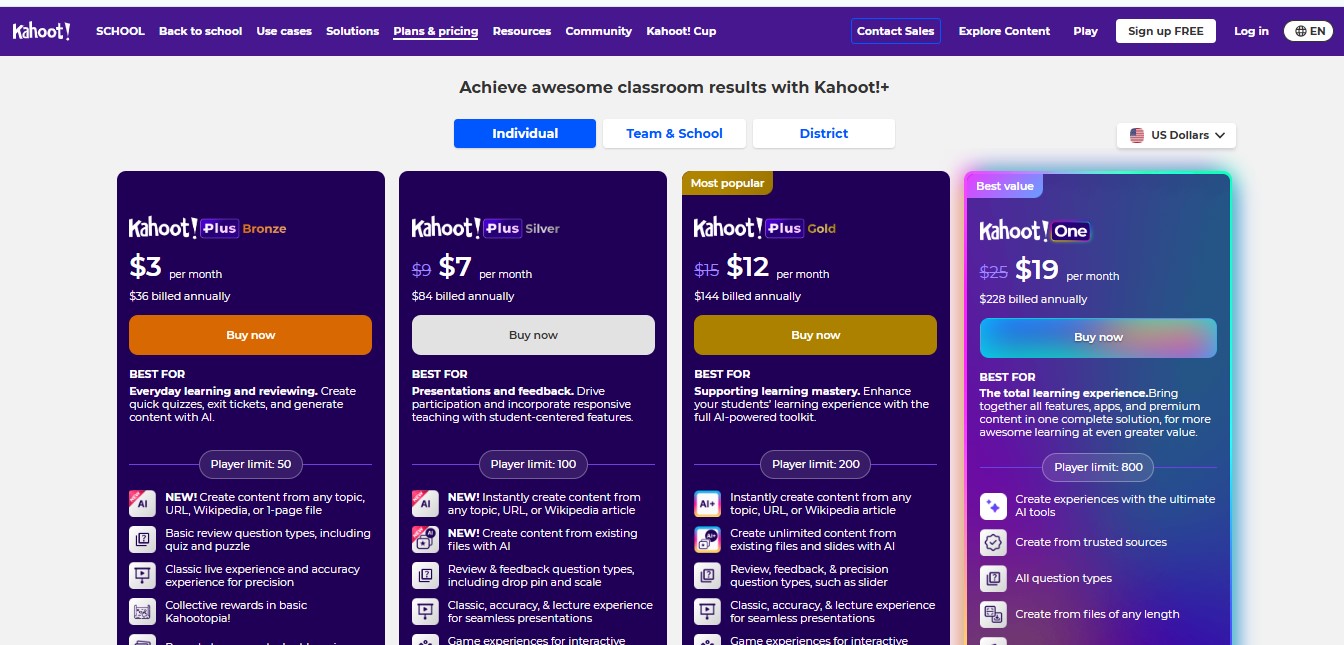
Plan | Price | What You Actually Get |
|---|---|---|
Basic | Free | Live quizzes, up to 10 players, very limited AI |
Plus Bronze | $3.00/mon | More players, very light AI generation — still limited |
Plus Silver | $7.00/mon | AI from URLs and files, more question types, lecture mode |
Plus Gold | $12.00/mon | Advanced question formats, better reporting |
Kahoot One | $19.00/mon | Unlimited AI, full study modes, large classes |
Kahoot AI Question Generator: How It Works
This is probably the Kahoot AI feature most teachers will use first. You can use it to get a first draft of quiz questions instead of starting with a blank screen. I wouldn’t treat the generated quiz as finished, though. Read through the questions, check the answers, and adjust anything that doesn’t fit what you actually taught.
If you’re specifically looking for the official Kahoot AI question generator, use the AI tools inside Kahoot’s own Create interface rather than a third-party site using the Kahoot name.
What is the Kahoot AI question generator good at?
It works particularly well for straightforward review questions, vocabulary, factual recall, and getting a first draft of a quiz from material you’re already teaching. It’s less useful when the questions need a lot of classroom context or genuinely require students to explain, evaluate, or make connections.
What About KahootGPT?
You may see searches for “KahootGPT” when looking for ways to create Kahoot quizzes with AI.
Kahoot now has an official ChatGPT app that can turn things like PDFs, articles, study notes, and ideas into Kahoots. You can review and edit the generated questions before saving them to your Kahoot account.
So if you’re searching for “KahootGPT,” you’re probably looking for this type of ChatGPT-to-Kahoot workflow rather than a separate product called KahootGPT.
For teachers who already use ChatGPT, this can be another convenient way to start a Kahoot without manually building every question.
Strong live classroom engagement
Kahoot’s biggest strength is still live classroom interaction. Students can join with a game PIN, answer questions from their devices, and see results as the activity progresses.
That makes it particularly useful for warm-ups, review sessions, formative assessment, and end-of-unit practice. The competitive format can be motivating for many students, although teachers should consider using team or other less competitive modes when a leaderboard may not suit the class.
How to create quiz game with kahoot, watch this simple explained video tutorial.
What Kahoot AI Does Not Do Well — Honest Weaknesses
AI question quality needs editing. The AI quiz generator is fast, but outputs are inconsistent. It tends to produce surface-level factual recall questions and struggles with generating questions at higher Bloom’s Taxonomy levels. Always review before using with students.
The free plan is too limited for real classroom use. Unlike MagicSchool AI or Diffit where the free plan genuinely covers core needs, Kahoot’s free plan hits walls quickly — player limits, question type restrictions, and locked AI features all push teachers toward paid tiers.
Not built for lesson planning or differentiation. Kahoot is excellent for the engagement and assessment phase of learning. It does not help with lesson planning, differentiated materials, IEPs, or grading feedback. Do not expect it to replace MagicSchool AI or Diffit.
Competition can stress some students. The competitive leaderboard motivates many students — but for anxious students or those with learning differences, public scoring can cause genuine distress. Kahoot does offer team modes and anonymous options, but this requires intentional setup.
Mistakes Teachers Make with Kahoot AI
Using AI questions without reviewing them. The most common mistake. AI-generated questions range from excellent to factually questionable. Always review AI-generated questions before using them with students.
Overusing it. The platform’s educational games are attractive only when used occasionally. Using it too often can reduce its impact. If every lesson becomes a Kahoot, the activity may feel less special and may not be the best use of class time.. Use it strategically — for review, warm-ups, and special occasions — not every lesson.
Upgrading too soon. Many teachers pay for Plus Silver or Gold before properly testing the free plan. Start free, run 3–4 games, and only upgrade if you consistently hit the player limit or need URL-based AI generation.
Ignoring the data. After every game, Kahoot provides a detailed report showing question-by-question results. Most teachers close it immediately. That data tells you exactly what to reteach tomorrow — it is some of the most actionable formative assessment data available in any tool.
How to Use Kahoot AI Features — Step by Step
To generate a quiz with AI:
- Go to create.kahoot.it and sign in
- Click Create and select Kahoot Generator.
- You can also open the creator and click Generate from the left panel.
- Enter your topic, paste a URL, or upload a file
- Choose number of questions and difficulty level
- Review and edit generated questions — always do this step
- Save and launch your game
To use Confidence Mode:
- Open your saved Kahoot
- Click Play → Live game
- Under Game options, enable Confidence mode
- Run the game as normal — students will rate confidence before answering
How can use Kahoot with others AI?
Kahoot works best as one piece of a larger AI toolkit — not as a standalone solution.
Here is how it fits into a practical weekly teaching routine:
- Use ChatGPT to write lesson plans for the week
- Teach using Canva presentations and Diffit leveled materials
- Run a Kahoot AI-generated review game covering the week’s content
- Use Brisk Teaching for written feedback on assignments
Kahoot owns the Friday review slot. It does that job better than any other tool available.
Kahoot vs Other AI Quiz Tools
Feature | Kahoot | Conker | MagicSchool AI | Gibbly |
|---|---|---|---|---|
Live classroom games | ✓ Strong | ✕ No | ✕ No | ✓ Strong |
AI quiz generation | ✓ Yes | ✓ Yes | ✓ Yes | ✓ Yes |
Free AI options | △ Limited | ✓ Yes | ✓ Yes | ✓ Yes |
Formative assessment | ✓ Strong | ✓ Yes | ✓ Yes | ✓ Yes |
AI lesson planning | △ Limited | △ Limited | ✓ Strong | △ Limited |
Choose Kahoot if your priority is live classroom interaction. Choose a more AI-focused teacher tool if your main goal is lesson planning, differentiation, or generating teaching materials.. For free AI quiz generation without paying, Conker or MagicSchool AI are better free options.
Is Kahoot Worth It in 2026?
For live classroom engagement and review games — yes, absolutely. Nothing else creates the same energy in a room of 30 students.
For AI quiz generation specifically — it depends on your budget. The free plan is too limited for serious classroom use. At $7/month for Plus Silver, the AI features become genuinely useful. Whether that cost is justified depends on how frequently you run live review games.
I will suggest: Start with the free plan for 2–3 weeks. If you are running Kahoot games at least weekly and hitting player or feature limits, upgrading to Plus Silver at $7/month is reasonable. If you only use it occasionally, the free plan is enough.
For free AI quiz generation without a subscription, see our guide on the best AI quiz generators for classrooms.
Wondering how it stacks up against a more discussion-focused tool? See our Curipod vs Kahoot comparison.
Want to compare Kahoot side by side against any of 100+ other AI tools? Try our AI tool comparison tool.Frequently Asked Questions
Some Kahoot AI features may be available depending on your account and plan, but access and limits vary. If you want a specific AI feature such as generation from PDFs, URLs, or slides, check whether it is included in your current plan before upgrading.
Yes. Kahoot includes AI-powered features that can help teachers create quiz questions and other classroom content more quickly. Its AI tools are built into the wider Kahoot platform, so you can still use the service for traditional quizzes, polls, presentations, and classroom activities.
Kahoot’s AI features are designed mainly to help teachers create content faster. The AI question generator is the most obvious example, allowing teachers to generate quiz questions from a topic or source material. Kahoot has also expanded its AI-assisted content and creation features over time.
Not exactly. Kahoot is primarily a classroom engagement, quiz, and assessment platform that now includes AI-powered features. Think of AI as one part of Kahoot rather than the entire product.
Yes. Kahoot’s AI question generator can create a first set of quiz questions based on the information you provide. Teachers should still review and edit the questions before using them with students, especially when accuracy and alignment with a specific lesson matter.