Writing a good quiz is slower than it looks. Building a quiz that is actually aligned to what you taught — with plausible wrong answers, not obvious throwaways — takes longer than most people outside teaching realise.
In this guide, I will cover the 8 best AI quiz generators for classrooms in 2026 — compared on what they actually generate, what the free tier really includes, and who each one suits.
Table of Contents
Why Use AI Quiz Generators for Classrooms?
Creating effective quizzes can be time-consuming, especially when teachers are juggling lesson planning, grading, and classroom management. AI quiz generators make this task faster and easier, enabling teachers to quickly produce customized quizzes that reinforce learning and assess student understanding.
Game-based quizzes tend to lift participation in review sessions, though how much they help retention depends heavily on how the questions are written.
Let’s dive into the best tools available right now.
Quiz Maker, Test Generator or Practice Questions: Which Do You Need?
These terms get used interchangeably, and most tools market themselves under several of them at once. The distinction that actually matters is not the label but what the tool produces and where the output ends up.
- An AI quiz maker is built for short, low-stakes checks — exit tickets, review games, do-now questions. Output is usually interactive and lives inside the platform. Gibbly and Wayground sit here.
- An AI test generator or exam generator is aimed at longer, graded assessments. What matters here is export: you need a clean document you can print or drop into your LMS, plus an answer key. Conker and GradeWithAI are the stronger picks for this.
- A practice question generator produces volume for revision rather than assessment. Students often drive it themselves. Knowt is the clearest example, since it builds questions from a student’s own notes.
Work backwards from the output you need. If you want a printable unit test with a key, a gamified quiz maker will frustrate you no matter how good its question generation is — and the reverse is equally true.
1. Conker
Conker is a dedicated AI quiz maker built specifically for teachers, supporting 10+ question formats with automatic reading level adjustment and LMS integration.
Key features:
- Supports multiple question formats including multiple choice, short answer, and fill-in-the-blank. Exports quizzes directly to Google Forms for easy distribution and auto-grading. Also integrates with Google Classroom and other LMS platforms.
- Standards alignment with thousands of ready-made question sets aligned to common K-12 curriculum standards like NGSS and TEKS.
- Every Conker-generated quiz can utilize text-to-speech read-aloud, helping students who need auditory assistance.
Pricing: Free tier available — genuinely usable for classroom quiz creation without upgrading.
Best for: Teachers who want fast, reliable dedicated quiz generation with Google Forms and LMS integration.
2. MagicSchool AI
MagicSchool AI excels in dedicated question creation tools. It can generate multiple choice quizzes from text, and has a specialized Depth of Knowledge question generator which produces questions at different DOK levels based on your topic or standard. MagicSchool integrates with Google Classroom, Canvas, and Schoology for easy export.
Key features:
- Generate quizzes from topics, lesson notes, or learning objectives
- Depth of Knowledge and Bloom’s Taxonomy question levels
- One-click export to Google Docs or Word
- Part of an 80+ tool ecosystem for teachers
Pricing: Free plan available — no credit card needed.
Best for: Teachers who already use MagicSchool AI for lesson planning and want quiz generation built into the same platform. Read our full MagicSchool AI review for more details.
3. Gibbly
Gibbly excels at gamified quiz creation with curriculum alignment .
Key features:
- AI generates curriculum-aligned gamified quizzes instantly
- Students compete in real time, which tends to lift participation in review sessions
- Standards-aligned question generation
- Simple enough for any teacher to use immediately
Pricing: Free plan available.
Best for: Elementary and middle school teachers who want to boost student engagement with game-based learning.
4. Knowt
Knowt is best for students owning their own revision — it lets students generate their own quizzes directly from their notes and flashcards using spaced repetition.
Key features:
- Students upload their notes → Knowt generates quizzes automatically
- Spaced repetition algorithm helps students remember longer
- AI-driven flashcards alongside quiz generation
- Free for students
Pricing: Free for students. Teacher plans available.
Best for: High school teachers who want students to take ownership of their own studying and review.
5. Wayground (formerly Quizizz AI)
Wayground, formerly known as Quizizz AI, is a widely used AI quiz platform in schools and online classrooms. It uses AI to generate quiz questions from topics, lessons, or uploaded content so teachers can create quizzes in minutes instead of starting from scratch.
Key features:
- Generate quizzes from uploaded content, topics, or URLs
- Strong reporting and analytics dashboard
- Assign quizzes as homework or in-class activities
- Widely used — familiar to many students already
Pricing: Free plan available. Paid plans from $30/month.
Best for: Teachers who care about quiz delivery and reporting, not only content creation.
6. ClassPoint AI
ClassPoint AI automatically generates quiz questions from your existing slide content or notes. You can specify the cognitive level of questions based on Bloom’s Taxonomy and generate questions in over 30 different languages. Each AI-generated question is added to your slide with an interactive button so you can collect responses in real time.
Key features:
- Works entirely inside PowerPoint — no new platform to learn
- Generates questions directly from your existing slides
- Real-time student response collection
- Supports 30+ languages for multilingual classrooms
Pricing: Free plan includes 20 AI question generations per month. Pro upgrade at ~$96/year gives 500 AI credits per month.
Best for: Teachers who build lessons in PowerPoint and want quiz questions generated directly from their slides.
7. GradeWithAI Quiz Generator
GradeWithAI generates multiple choice, true/false, short answer, fill-in-the-blank, and matching questions in one pass from a single topic description. Every quiz ships with a teacher version and a student version — toggle answers on and off, print to PDF, and hand it out or keep it digital.
Key features:
- Plausible distractors based on common misconceptions — not random wrong answers
- Difficulty calibrated to the grade level you pick from K-12 through AP and college
- Answer keys with explanations for every question
- Print-ready PDFs in both student and teacher formats
- Connects directly with Google Classroom and Canvas
Pricing: Free forever for quiz generation.
Best for: Teachers who want a completely free, no-login quiz generator that covers every question format.
8. Edcafe
Edcafe offers an interactive, student-facing quiz maker that can create quizzes from multiple input sources. Instead of stopping at question generation, it also helps teachers assign quizzes directly to students via link, QR code, or LMS integration. When students take the quiz, they receive grading and feedback on the spot, surfaced to teachers through real-time dashboards, plus a dedicated Analytics Assistant to help dive deeper into learning progress.
Key features:
- Create quiz questions from a topic, webpages (including YouTube videos), or uploaded files
- Assign quizzes in three different modes — link, QR code, or LMS integration
- Built-in auto-grading and AI-assisted feedback
- Track submissions with real-time dashboards and an Analytics Assistant
Pricing: Free plan available. Paid plans start at $7.99/month.
Best for: Teachers who want to support the complete quiz workflow from creation to grading to insights.
What to Check in an AI-Generated Quiz Before You Use It
Every tool on this list writes questions quickly. None of them writes reliably good questions every time. Whichever generator you pick, the same handful of faults keep appearing — and they are all easier to catch once you know the shape of them.
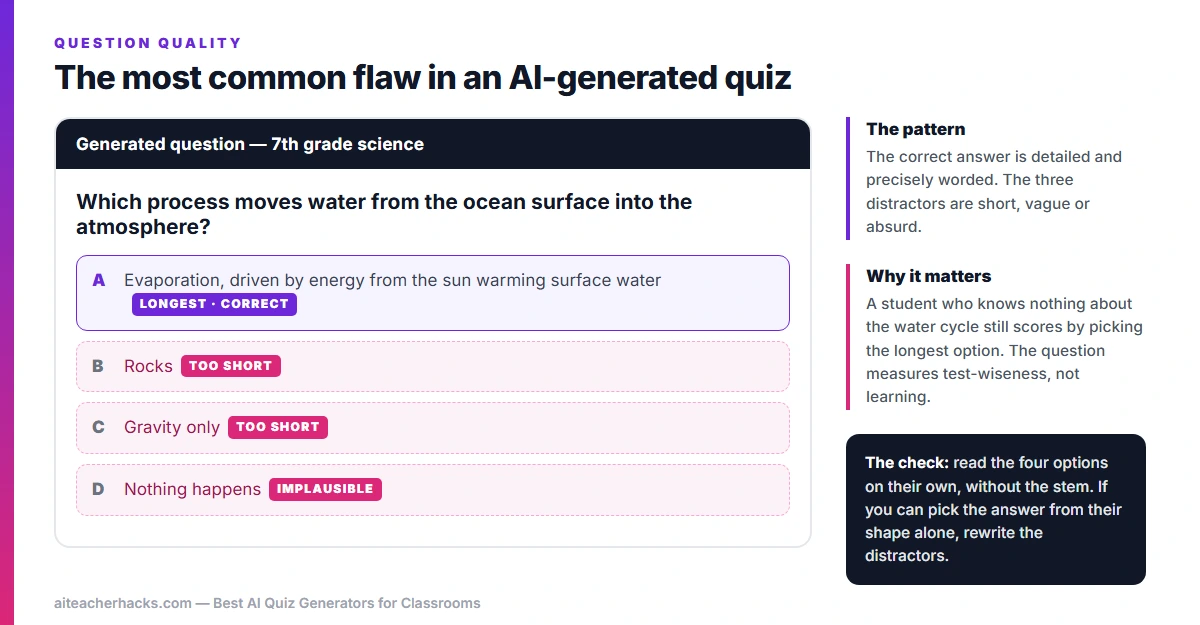
1. Giveaway distractors. The most common failure by a wide margin. The correct option is detailed and precisely worded; the three wrong options are short, vague or faintly absurd. A student who knows nothing about the topic still scores well by picking the longest answer. Read the four options on their own, without the question stem, and ask whether you could identify the answer from their shape alone.
2. Two defensible answers. AI writes distractors without rigorously checking that each one is unambiguously wrong. You end up with a question where option B is intended but option D is also arguably true under a reasonable reading. This is the fault most likely to surface mid-quiz, with a hand up and the rest of the class waiting.
3. Reading level drift. Ask for fourth-grade questions and the vocabulary in the stems often lands closer to sixth or seventh. The concept is pitched correctly; the language is not. This matters most for exactly the students the assessment is meant to help you identify, because they miss questions they actually understand.
4. Recall dressed up as application. Request higher-order questions and you will frequently get definition questions wearing application vocabulary. “Which of the following best describes…” is still recall, however it is phrased. Check that the student has to do something with the concept rather than just recognise it.
5. Answer key errors. Rare, but not rare enough, and the costliest to miss because it penalises the students who got it right. Work through the key yourself before you print. On a twenty-question quiz that takes about three minutes and is the highest-value check on this list.
None of this is an argument against these tools. A generated draft plus ten minutes of review is still far quicker than writing twenty questions from a blank page. But the review is not optional, and no tool here removes it.
Quick Comparison Table
Tool | Best For | Free Plan | Google Integration |
|---|---|---|---|
Conker | Dedicated quiz generation | ✓ Yes | ✓ Google Forms |
MagicSchool AI | All-in-one platform | ✓ Yes | ✓ Google Classroom |
Gibbly | Gamified quizzes | ✓ Yes | ✓ Yes |
Knowt | Student-led revision | ✓ Yes | ✓ Yes |
Wayground | Assignment distribution | ✓ Yes | ✓ Yes |
ClassPoint AI | PowerPoint integration | △ Limited | ✓ Yes |
GradeWithAI | All-format free quizzes | ✓ Yes | ✓ Yes |
Edcafe | Full quiz cycle (create to grade) | ✓ Yes | △ Limited |
How to Choose the Right AI Quiz Generator for Your Classroom
The best framework is simple: outsource the doing, not the thinking. If you need fast, reliable quiz generation and nothing else, go with Conker. If engagement is your priority, try Gibbly. If you want one platform for everything, MagicSchool AI. If you want students owning their revision, Knowt. Do not pick the flashiest tool — pick the one that solves the specific friction in your week.
Also consider:
Variety of quiz types — look for tools that offer different formats such as multiple choice, true/false, and short answer. Ease of use — the interface should allow you to create quizzes quickly without a steep learning curve. Customization — ensure you can customize questions to align with your curriculum and teaching style.
Tips for Getting the Best Results from AI Quiz Generators
Always review AI output. AI quiz generators are fast but not perfect. Always check questions for accuracy, grade-level appropriateness, and alignment with what you actually taught before giving them to students.
Combine with other AI tools. Use ChatGPT prompts for teachers to generate lesson content first, then feed that content into your quiz generator of choice for perfectly aligned assessments.
Use student data to improve. Most tools above offer analytics dashboards. Check which questions students got wrong most often and use that data to plan your next lesson.
Start with the free plan. All four top tools — Conker, Gibbly, MagicSchool, and Knowt — offer free tiers that are genuinely usable for classroom quiz creation, not just limited teasers.
Conclusion
AI quiz generators for classrooms are no longer a nice-to-have in 2026 — they are a genuine time saver that every teacher should be using. Whether you want gamified engagement, Google Forms integration, or a completely free all-format quiz maker, there is a perfect tool on this list for your classroom.
Start with Conker or GradeWithAI if you want the simplest free option. Try MagicSchool AI if you want quiz generation as part of a bigger toolkit. And check out our full guide on the best AI tools for teachers in 2026 for even more ways to save time in your classroom.
Frequently Asked Questions
Yes — all 7 tools in this guide have free plans that are genuinely useful for classroom quiz creation without needing to pay.
No. All tools in this guide are designed to be beginner-friendly. Most teachers are up and running within 5 minutes without any technical knowledge.
Yes. Knowt is specifically designed for students to generate their own quizzes from their notes. Wayground and Gibbly also have strong student-facing features for self-study and review.