Are you looking for ChatGPT prompts for teachers that actually work in a real classroom? You are in the right place. In this guide, I have collected 50 of the best ready-to-use ChatGPT prompts for teachers — organized by task so you can find exactly what you need in seconds.
These prompts help educators create lesson plans, generate differentiated materials, write rubrics, build assessments, and draft parent communications in minutes instead of hours. Just copy, paste, and replace the brackets with your own details.
If you work at a U.S. K–12 school, check whether you already qualify for free, unlimited access through OpenAI’s own program — see our ChatGPT for Teachers review to check eligibility before you hit any usage limits on a personal account.
Table of Contents
How to Use These Prompts
The best prompts include the grade level, subject, objective, student needs, time available, materials, and final format. A vague prompt like “Create a lesson on fractions” produces generic work, while a specific prompt like “Create a 35-minute Grade 4 lesson on equivalent fractions with manipulatives, two checks for understanding, and one exit ticket” produces something a teacher can actually edit and use.
Simply replace anything in [brackets] with your own information before pasting into ChatGPT.
What Makes a Good ChatGPT Prompt for Teachers?
Most generic prompts give generic results. Ask ChatGPT to “make a lesson plan” and you get something so broadly applicable it is useful to no teacher in particular.
The prompts that actually save time share four things.
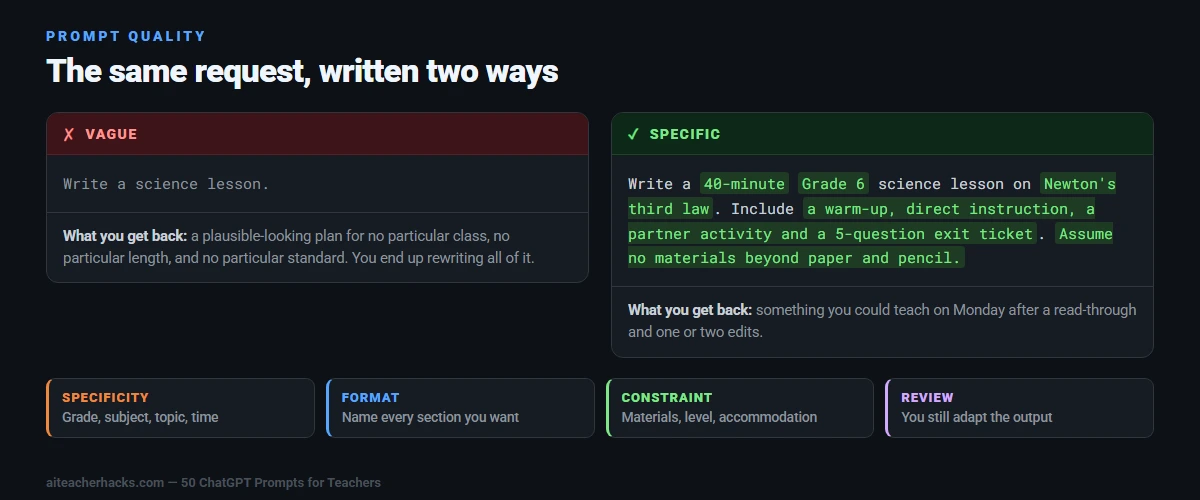
Specificity. Grade level, subject, topic, student needs, time available. “Write a 40-minute Grade 6 science lesson on Newton’s third law with a partner activity and a five-question exit ticket” produces something teachable. “Write a science lesson” does not.
Format instruction. Tell it what shape you want back — warm-up, direct instruction, guided practice, exit ticket. Leave it out and ChatGPT picks a structure that may have nothing to do with how you plan.
A constraint. Time limit, materials to hand, reading level, an accommodation you have to meet. Constraints are what force the output to be realistic rather than ideal. “Nothing but paper and pencil” produces a very different lesson to an open prompt.
A review step. No prompt removes the need to read and adapt what comes back. ChatGPT does not know your class, your school, or what you covered on Tuesday. Everything below is a starting point; the finished lesson is still yours.
The fifty prompts in this guide are written with those four principles built in. Replace the [brackets] with your own details and you will get noticeably more usable output than a vague request.
Lesson Planning Prompts (10 Prompts)
These are the most time-saving ChatGPT prompts for teachers. Use them to create complete lesson plans in minutes.
- “Create a detailed [X]-minute lesson plan for [grade level] students on [topic]. Include learning objectives, materials needed, introduction activity, main activity, assessment, and differentiation strategies. Align with Common Core standards.”
- “Write a 3-day unit plan for [grade level] [subject] on [topic]. Include daily objectives, activities, and assessments for each day.”
- “Create an engaging warm-up activity for a [grade level] [subject] class starting a new unit on [topic]. It should take no more than 10 minutes.”
- “Design a hands-on science experiment for [grade level] students on [topic]. Include materials list, step-by-step instructions, and discussion questions.”
- “Write a project-based learning activity for [grade level] students on [topic]. Include the driving question, student tasks, materials, timeline, and grading rubric.”
- “Create a [grade level] math lesson on [topic] that uses real-world examples students can relate to. Include a warm-up, direct instruction, practice activity, and exit ticket.”
- “Write a reading comprehension lesson for [grade level] using [book title or type of text]. Include pre-reading, during-reading, and post-reading activities.”
- “Design a STEM lesson for [grade level] students that combines [subject 1] and [subject 2]. Include learning goals, materials, and a step-by-step activity.”
- “Create a substitute teacher lesson plan for [grade level] [subject] that requires no prior knowledge of the class. Make it self-explanatory and easy to follow.”
- “Write a lesson plan hook or attention-grabber for a [grade level] lesson on [topic]. Make it creative and engaging for students.”
Differentiation Prompts (8 Prompts)
Using the right ChatGPT prompts for teachers, you can quickly create different versions of the same material — adjusting reading levels, providing explanations, assigning different tasks, and making personalized study plans.
- “Rewrite this passage at three reading levels: beginner, intermediate, and advanced. Keep the key ideas the same and provide a short comprehension question for each version. [Paste your text here]”
- “Explain [concept] in very simple language for a [grade level] student who is struggling. Include one example and one quick-check question.”
- “Suggest modifications to this assignment for a student with an IEP focused on [specific challenge]. [Paste assignment here]”
- “Create three versions of this math problem at different difficulty levels: below grade level, on grade level, and above grade level. [Paste problem here]”
- “Write differentiated discussion questions for [grade level] students on [topic]. Create one set for struggling learners and one set for advanced learners.”
- “Translate this classroom instruction into [language] for multilingual learners new to English. [Paste instruction here]”
- “Create a visual step-by-step guide for [grade level] students who are visual learners to complete [task or assignment].”
- “Suggest 5 extension activities for advanced [grade level] students who finish their work on [topic] early.”
Assessment and Grading Prompts (8 Prompts)
- “Create a 10-question multiple choice quiz for [grade level] students on [topic]. Include an answer key.”
- “Write 5 open-ended discussion questions for [grade level] students on [topic]. Include sample strong answers.”
- “Create a detailed grading rubric for a [grade level] [assignment type] on [topic]. Include 4 performance levels: Excellent, Proficient, Developing, and Beginning.”
- “Write an exit ticket with 3 quick questions to check [grade level] student understanding of [topic].”
- “Generate 10 short-answer questions for a [grade level] [subject] test on [topic]. Include an answer key.”
- “Create a self-assessment checklist for [grade level] students to evaluate their own [project or assignment].”
- “Write constructive written feedback for a student who scored [score] on [assignment]. Be encouraging and specific about how they can improve.”
- “Create a peer review form for [grade level] students to give feedback on each other’s [assignment type].”
Parent Communication Prompts (6 Prompts)
Effective communication does not have to take hours — ChatGPT can help craft messages that are professional, friendly, and tailored to different audiences, saving time while maintaining a personal touch.
- “Write a progress update email for parents of a [grade level] student who is struggling in [subject]. Be constructive, encouraging, and suggest specific ways parents can help at home.”
- “Draft a beginning-of-year welcome email to parents of my [grade level] class. Include classroom expectations, communication procedures, and an encouraging tone.”
- “Create a monthly classroom newsletter for [grade level] parents summarizing what we have learned, upcoming events, and ways to support learning at home.”
- “Write a reminder email to [grade level] students about an upcoming [event or deadline] using an encouraging and motivating tone.”
- “Draft an email to a parent about a behavior concern with their child. Be respectful, factual, and solution-focused.”
- “Write a positive recognition email to parents celebrating their child’s improvement or achievement in [subject or area].”
Classroom Management Prompts (6 Prompts)
- “Help me brainstorm classroom rules and norms for a [grade level] class. Consider behavior, respect, and academic expectations. Make them positive and student-friendly.”
- “Create a calm-down corner routine for [grade level] students. Include steps, visual supports, and suggested tools to include.”
- “Suggest 10 quick brain break activities for [grade level] students that take 2-3 minutes and require no materials.”
- “Write a classroom morning meeting agenda for [grade level] students that takes 15 minutes. Include a greeting, share, activity, and message.”
- “Create a behavior intervention plan outline for a [grade level] student who struggles with [specific behavior]. Include triggers, strategies, and positive reinforcement ideas.”
- “Suggest 5 strategies to re-engage a [grade level] student who is consistently off-task during [subject] lessons.”
Student Engagement Prompts (6 Prompts)
- “Create a fun review game for [grade level] students on [topic]. Include rules, materials needed, and how to play.”
- “Write 5 creative writing prompts for [grade level] students related to [topic or theme].”
- “Design a collaborative group project for [grade level] students on [topic]. Include roles, tasks, timeline, and final product.”
- “Create a vocabulary activity for [grade level] students learning these words: [list words]. Make it interactive and engaging.”
- “Suggest 5 ways to gamify my [grade level] [subject] classroom to increase student motivation and engagement.”
- “Write a real-world scenario for [grade level] students that requires them to apply what they have learned about [topic].”
Special Education and IEP Prompts (6 Prompts)
- “Write IEP goal suggestions for a [grade level] student who struggles with [specific skill]. Include measurable benchmarks.”
- “Create accommodations and modifications for a [grade level] student with [learning need] for a unit on [topic].”
- “Write a social story for a [grade level] student with autism about [specific classroom situation or transition].”
- “Create sensory-friendly classroom activity alternatives for a student with sensory sensitivities for [specific lesson or activity].”
- “Write a behavior support plan summary for a [grade level] student who struggles with [behavior]. Include antecedents, replacement behaviors, and reinforcement strategies.”
- “Suggest 5 ways to build a positive relationship with a [grade level] student who is withdrawn and reluctant to participate.”
Pro Tips for Getting the Best Results
The quality of what you get from ChatGPT depends entirely on what you put in. A well-crafted prompt gives the AI clear direction, which leads to more accurate, useful, and classroom-ready responses.
Always include: grade level, subject, topic, time available, and any special student needs.
Use follow-up prompts: If the first response is not quite right, ask ChatGPT to adjust it. Try “Make this more hands-on” or “Simplify this for struggling readers.”
Save your best prompts: Keep a personal document of prompts that work well for your class. Reuse and adjust them every week to save even more time.
Review everything: Always read AI-generated content before using it with students. You are the expert — ChatGPT is just your assistant.
Conclusion
These 50 ChatGPT prompts for teachers are your shortcut to saving hours every single week. Start with the lesson planning prompts, then explore differentiation and assessment as you get comfortable.
Want to learn more? Check out our complete guide on how to use ChatGPT to write lesson plans and our list of the best AI tools for teachers in 2026.
Using these prompts for your own planning is one thing — putting ChatGPT directly in front of students is a different call. See our Khanmigo vs ChatGPT for Teachers comparison if you’re weighing that decision.
Want to compare ChatGPT side by side against any of 100+ other AI tools? Try our AI tool comparison tool.Frequently Asked Questions
Yes — all 50 prompts are completely free. Just copy and paste them into ChatGPT’s free version at chat.openai.com.
Start with 2-3 prompts per week. Pick the tasks that take you the most time and let AI handle the first draft.
Yes. Almost everything here is portable — the same bracket-fill prompts work in Google Gemini, Claude, Microsoft Copilot and MagicSchool’s custom prompting.
One difference worth knowing: MagicSchool AI has purpose-built tools for several of these jobs — lesson plans, rubrics, IEP goals — so for those specific tasks you may get tidier output there without writing a prompt at all.
Mostly not as written. These are classroom prompts. School leaders need something different — observation feedback, improvement plan drafts, policy communication, staff meeting agendas, letters to the wider parent community.
You can adapt many of them by swapping “[grade level] students” for “teaching staff” and rewriting the context, but the fit is rough. A dedicated set of leadership prompts is a better answer, and one is planned.