Table of Contents
Search for “AI certification for teachers” and you will find a dozen lists of free courses, most of them recycled from the same press releases. This guide does something narrower. For each program we read the vendor’s own page and wrote down what it actually says about time, cost, and what you walk away with. Everything below was checked on September 28, 2026, and where a page does not say something (like how many hours a course takes), we say so instead of guessing.
The pattern is worth knowing before you start. Almost all of these are free, most take under an hour, and only one is an exam. What none of them is, on the vendors’ own wording, is a teaching credential or a promise of professional development credit.
The Short Version: Time, Cost, and What You Get
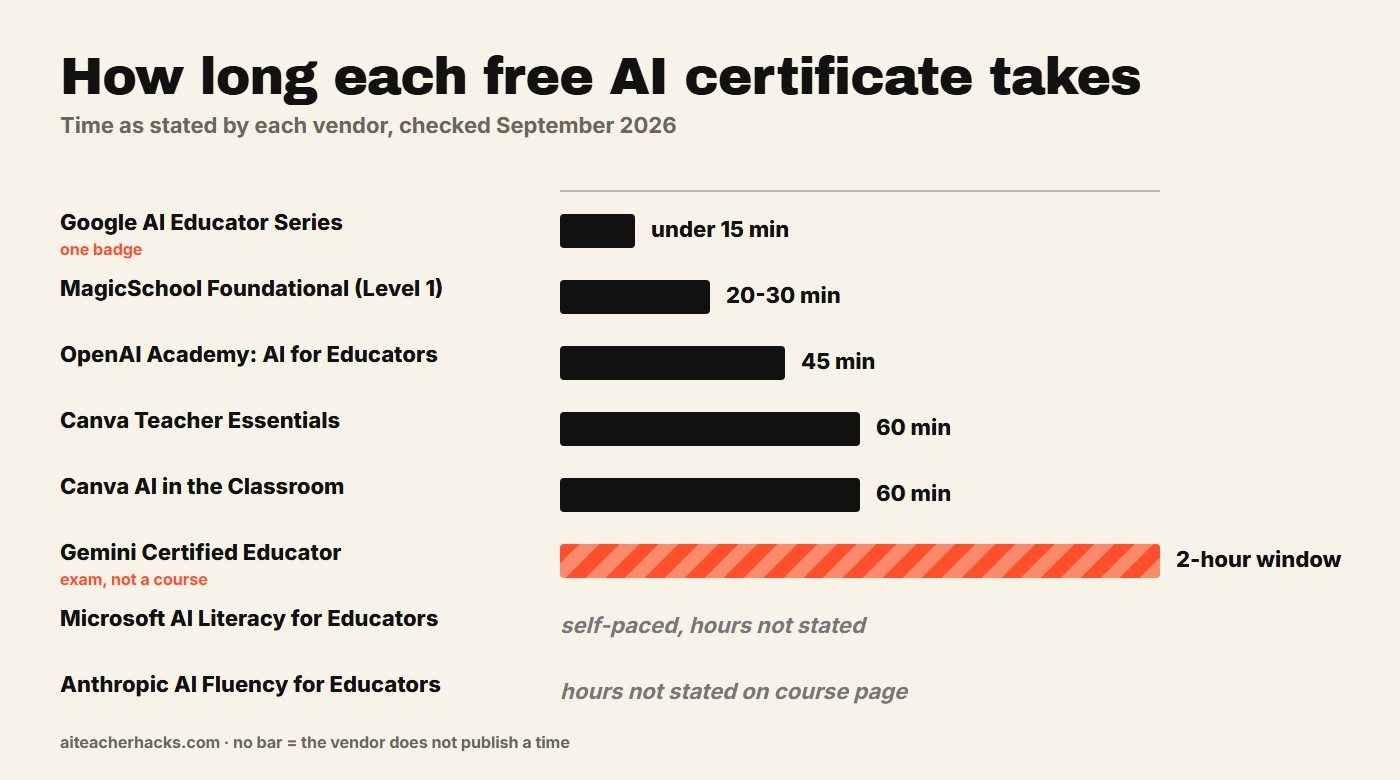
Program | Time | Cost | Assessment | What you get |
|---|---|---|---|---|
Google AI Educator Series | Under 15 min per badge | Free | None stated | ISTE-aligned digital badges |
Gemini Certified Educator (Google) | 2-hour exam window | Free | Multiple-choice exam | Certificate, valid 3 years |
MagicSchool Foundational AI (Level 1) | 20-30 min | Free | Not stated | MagicSchool certification |
Microsoft AI Literacy for Educators | Self-paced, hours not stated | Free | Not stated | Credential co-created with ISTE+ASCD |
OpenAI Academy: AI for Educators | 45 min | Free (ChatGPT account needed) | 10-20 question assessment, 80% to pass | Badge (not a certification, per OpenAI) |
Canva Teacher Essentials | 60 min | Free | Not stated | Digital certificate |
Canva AI in the Classroom | 60 min | Free | Not stated | Certification (per Canva) |
Anthropic AI Fluency for Educators | Hours not stated | Not shown on course page | Not stated | Completion certificates |
A Badge Is Not a Certification
The word “certification” is doing a lot of work in this space. Read the fine print and you find three different things sold under one name: a badge for finishing a short course, a certificate for finishing a set of them, and an exam you actually have to pass.
OpenAI is unusually direct about it. Its help center says Academy badges and pathway certificates of completion are not certifications and do not guarantee eligibility for a future one. That is a fair description of most of this list: proof you spent the time, not proof of a licensed skill. Google’s Gemini Certified Educator is the one that leans toward a real assessment.
Two more things worth knowing. First, none of the vendor pages we read claims professional development hours or credit. MagicSchool’s course page does not specify any, and Microsoft’s announcement does not either. Districts set their own PD rules, so ask your PD coordinator before assuming a certificate will count. Second, these courses teach one vendor’s tools by design. That is useful if you use the tool and much less useful if you do not, which is why the “which to do first” section below matters more than the table.
Google: Free Badges and a Real Exam
Google runs two separate things. The Google AI Educator Series is free, on-demand training for K-12 educators, with sessions that take less than 15 minutes to earn a badge. Google describes the badges as official and ISTE-aligned, and says new modules arrive on the first Wednesday of every month (details on Google’s announcement). It is the lowest-friction entry point on this list.
The Gemini Certified Educator exam is the heavier option. Google announced it on November 17, 2025 alongside certifications for university students and high schoolers, all free. According to Google’s certification FAQ, the exam is multiple choice with a two-hour window, you register at educertifications.google and have 14 days to launch it, a failed attempt can be retaken after 8 days, and the credential is valid for 3 years, issued through Accredible. The pages we read do not state how many questions there are or what score passes, so we will not guess. Google says educators should come in with a foundational understanding of AI concepts and practical experience using Gemini.
If your school runs on Google Workspace, this pairs naturally with our Google Gemini for Teachers review and the guide to building Gemini Gems.
MagicSchool: Fast, but Only About MagicSchool
MagicSchool’s certification page lists free courses for educators, students, and admins. The Foundational AI Certification (Level 1) takes 20-30 minutes and covers MagicSchool’s tools plus workflows for saving time and using AI responsibly in class. Level 2 is listed as being refreshed and not yet available. There is also a 15-30 minute Adobe Image Generator course on making classroom visuals with Adobe Express, a 15-20 minute intro for students, and two admin courses (30 and 60 minutes, the second on AI policy and practice).
Our honest read: this is a product onboarding course with a certificate attached. That is not a criticism. If your school uses MagicSchool, half an hour is a cheap way to learn it properly. But because the page does not specify professional development hours or credit, treat it as a skill badge. Our MagicSchool AI review covers what the tool does and does not do, and if you are the one writing your school’s rules, the admin policy course pairs well with our classroom AI use policy template.
Microsoft: The Credential Built With ISTE+ASCD
Microsoft Elevate for Educators offers an AI Literacy for Educators credential pathway that Microsoft says was co-created with ISTE+ASCD and aligned to the AI Literacy Framework. Microsoft describes it as available at no cost to educators worldwide (see the Elevate for Educators page). Neither that page nor Microsoft’s announcement says how long it takes, so we cannot give you a number. The pathway is self-paced.
Around it sit other free resources: the Microsoft Learn Educator Center, a course called Unlock AI for Special Education, the AI Skills Navigator, and a classroom toolkit for teaching responsible AI to students aged 13-15. From how Microsoft describes it, this is the credential that focuses most on AI literacy rather than one product’s features, though it is still a vendor program. If your school already has Copilot, our Microsoft Copilot for Teachers guide explains how to check.
OpenAI: A 45-Minute Course With a Scored Assessment
OpenAI Academy’s AI for Educators course is listed at 45 minutes and covers lesson planning, activities, assessments, and communications, using ChatGPT. It is free, and you sign in with a ChatGPT account (a workspace membership is not required). Every Academy course has an assessment of 10 to 20 questions drawn from a bank of 50. Score 80% or higher and you earn a badge issued through Accredible; if you fall short, you can retry with a fresh set of questions. AI for Educators is a standalone course, so it does not build toward a pathway certificate.
As covered above, OpenAI says these badges are not certifications. Separately, its ChatGPT for Teachers announcement points to a ChatGPT Foundations course for K-12 educators created with Common Sense Media, and to a partnership with the American Federation of Teachers to equip 400,000 K-12 educators with practical AI skills. If you qualify for the free workspace, see our ChatGPT for Teachers review.
Canva: Two One-Hour Courses
Canva offers two free, self-paced certifications for teachers, each about 60 minutes. Teacher Essentials, unveiled at ISTELive on June 27, 2024, covers streamlining lesson planning, building interactive lessons, and using Canva’s AI tools such as Magic Write, Magic Animate, and Translate. It uses bite-sized videos plus hands-on activities, and once you finish the materials Canva issues a digital certificate (details in Canva’s announcement). AI in the Classroom is the newer, AI-focused course, also free, self-paced, and 60 minutes.
Canva’s announcement mentions completing the course materials, not passing an exam. If Canva is already part of your week, our Canva for Education review covers eligibility and what is free.
Anthropic: Aimed at Faculty and Instructional Designers
Anthropic’s AI Fluency for Educators course is described on its own page as for faculty, instructional designers, and educational leaders, helping them apply AI Fluency to their own teaching practice and institutional strategy. That framing points more toward higher education and school leadership than toward a K-12 teacher planning tomorrow’s lesson. The page says the course now lives on Claude Academy, and its notice about learning analytics mentions completion certificates. We could not find a listed time or price on the page, so check both when you enroll. For a classroom-focused look at Anthropic’s free offer, see our Claude for Teachers review.
Which One Should You Do First?
Start from the tool you already use, not the biggest name:
- Your school runs on Google: earn one or two Google AI Educator Series badges first (under 15 minutes each). Try the Gemini Certified Educator exam only if you want an assessed credential.
- Your school uses MagicSchool: do the Level 1 course (20-30 minutes).
- You are on the free ChatGPT for Teachers workspace: take OpenAI’s AI for Educators course (45 minutes).
- You use Microsoft 365: the AI Literacy for Educators credential, at your own pace.
- You live in Canva: Teacher Essentials (60 minutes).
- You want to teach students AI literacy, not just use tools: start with Microsoft’s credential and its classroom toolkit.
If you want a single-afternoon plan, one Google badge (under 15 minutes), MagicSchool Level 1 (20-30 minutes), and OpenAI’s AI for Educators (45 minutes) add up to at most 90 minutes on the times the vendors state, and they cover three different tools.
What None of These Will Do
None of them is a teaching license, and none of the pages we read promises professional development credit. Nothing here proves you can use AI well with students; that comes from practice and from your school’s own guidelines. If your district requires PD documentation, ask what it accepts before you spend an hour. And if a colleague says a particular course “counts,” ask where it counted. For the bigger picture of which tools are worth learning at all, start with our guide to the best AI tools for teachers.
Frequently Asked Questions
Google, MagicSchool, Microsoft, OpenAI, and Canva each state on their own pages that the courses or exams are free. Anthropic’s course page does not display a price in what we could read, so check when you enroll. OpenAI’s courses need a ChatGPT account to save your progress.
None of the pages we read promises PD hours or credit, and OpenAI says its badges are not certifications. Districts set their own rules, so ask your PD coordinator what they accept before you assume a certificate counts.
It is multiple choice with a two-hour window. Google’s FAQ does not state the number of questions or the passing score. You register at educertifications.google, get 14 days to launch the exam, can retake a failed attempt after 8 days, and the credential is valid for 3 years.
OpenAI’s help center says its courses are free and need a ChatGPT account, not a workspace membership. The other pages we read do not mention a paid account requirement.
Microsoft’s AI Literacy for Educators credential, co-created with ISTE+ASCD and aligned to the AI Literacy Framework, is the one that focuses most on AI literacy rather than a single product. It is still a vendor program, so no option on this list is truly independent.
Google’s and OpenAI’s credentials are issued as digital credentials through Accredible, which is built for sharing, and Canva issues a digital certificate. How much any of them matters to a principal is a local question, so treat them as evidence you did the training, not as a qualification.
One Response