Are you a special education teacher drowning in paperwork, IEPs, and behavior plans on top of your regular teaching duties? You are not alone. Special education teachers carry one of the heaviest documentation burdens in the entire profession — and AI is finally starting to help.
This guide is organised by the job you are trying to do, so if you are a special ed teacher after one specific thing — drafting IEP goals, a behavior intervention plan, a social story, differentiated materials, or an accessible version of an assignment — you can go straight to it. Each tool section says what that tool is genuinely good at, and where you still have to do the thinking yourself.
Table of Contents
The Special Education Teacher Crisis — And How AI Helps
With over 7.5 million public school students — 15% of total enrollment — having Individualized Education Plans, this creates an incredibly labor-intensive process for special educators. Special education teachers face mounting challenges managing growing caseloads as student achievement gaps continue to widen.
A survey published by the Center for Democracy and Technology found that 57% of special education teachers said they used AI to help develop individualized plans for their students during the 2024–25 school year, up from 39% the year before. The same survey found that only 22% had received any training or guidance on the risks involved — inaccuracy, bias and student privacy among them.
That gap between how fast adoption moved and how little training came with it is why this guide spends as much time on what to check as on what to use. AI can take the repetitive drafting and formatting work out of special education paperwork, but you still supply the student-specific knowledge, and you remain responsible for what goes into the file.
Used carefully, AI can support more genuinely individualized instruction, expand communication options for students with complex needs, and give back some of the hours that disappear into IEP documentation.
How AI Helps Special Education Teachers
Before we get to specific tools, here is what AI actually does well in special education — and, just as importantly, where you still have to do the work yourself. Every example below is a prompt you can adapt today.
1. Drafting IEP goals
AI is good at turning baseline information you supply into structured, measurable goal language. It is not good at deciding what the goal ought to be.
Try this: “Write three measurable reading-comprehension IEP goal drafts for a Grade 5 student who can identify the main idea with prompting but struggles to independently locate supporting details. Include a baseline, target behaviour, mastery criterion and measurement method.”
What you still do: supply the real baseline data yourself — never let the tool invent it — and check the finished goal against the student’s evaluation and current IEP.
2. Differentiating an assignment you already have
This is the most reliable everyday use. The learning objective stays fixed; only the scaffolding changes.
Try this: “Rewrite this Grade 6 informational text task with shorter sentences, chunked directions, a vocabulary support box and reduced reading load. Keep the learning objective and the required content vocabulary unchanged.”
What you still do: confirm the objective actually survived the rewrite. Differentiation that quietly lowers the target is not differentiation.
3. Writing social stories
A genuine strength, because the format is predictable and you supply the situation.
Try this: “Write a short first-person social story for an elementary student who becomes anxious when the classroom routine changes. Use simple language, a predictable structure, and concrete actions the student can take.”
What you still do: match the language to the student’s actual communication level, and decide whether a social story is the right intervention at all. AI drafts the story; it does not identify the need.
4. Simplifying directions without changing the task
Underrated, and it takes seconds.
Try this: “Rewrite these Grade 7 science directions using numbered steps, one action per line, and shorter sentences. Keep the scientific objective and the required vocabulary unchanged.”
What you still do: read it aloud. Directions that look clear on a screen are not always clear to a student who processes language slowly.
5. Behavior intervention plans
AI can organise strategies and keep wording consistent across a plan, which is where a lot of the drafting time goes.
Try this: “Draft a behavior intervention plan section for a middle-school student who leaves their seat during independent work. Include antecedent strategies, teaching strategies, response strategies, and a data collection method.”
What you still do: the functional behaviour assessment. AI has no access to your observation data and cannot determine the function of a behaviour.
6. Progress monitoring and report narratives
Turning a term of scattered notes into readable prose for a progress report is a real time saver.
Try this: “Turn these progress notes into a parent-friendly paragraph for a progress report, keeping every number exactly as written: [paste your notes].”
What you still do: supply the data from your own records, then check that no figure was rounded, dropped or invented during the rewrite.
7. Communication support
AAC tools that use AI to predict and assemble what a student is trying to say can be genuinely freeing for students with complex speech needs. This is specialist territory, though — decisions here belong with your speech and language therapist, not with a general chatbot.
Before You Use AI With Student Information
Special education work involves more sensitive information than almost anything else you do, so privacy has to come before convenience.
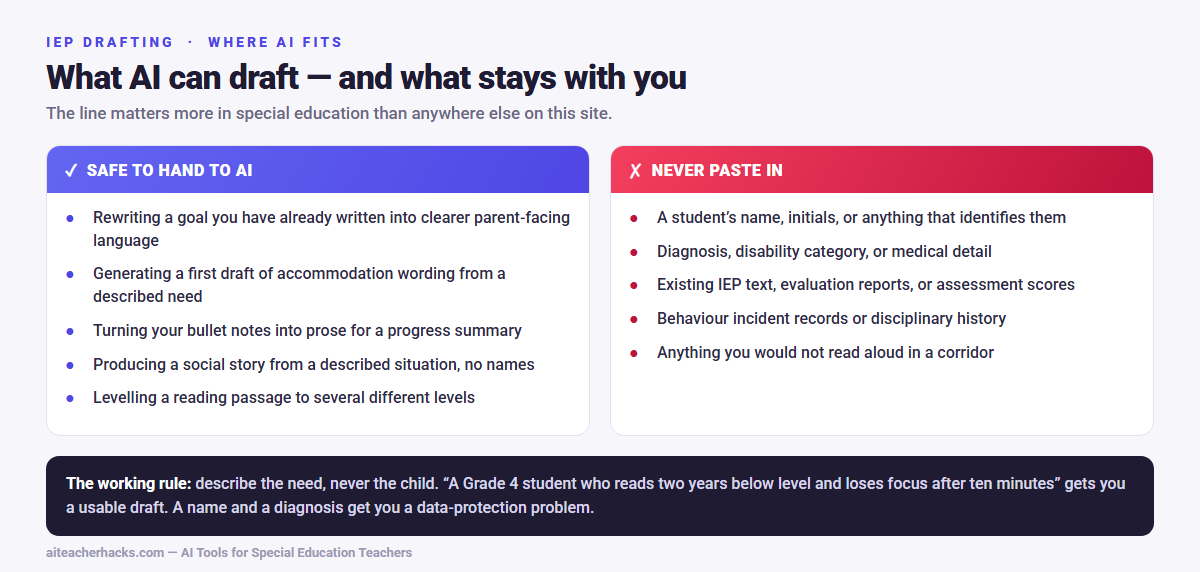
Start with your school or district AI and student-data policy. A tool being education-focused — or even district-approved — does not automatically mean every kind of student information is allowed to go into it.
With general-purpose AI tools such as ChatGPT, Gemini or Claude, the rule is simpler: keep identifying details out entirely. No full name, student ID or exact date of birth. No IEP or evaluation documents. No medical or disability records. No detailed disciplinary history.
Instead, strip the identifying detail and describe the instructional problem. Rather than:
“Write an IEP goal for John Smith, a 4th-grade student with autism whose evaluation says…”
write:
“Write three measurable reading goals for a 4th-grade student who needs support with reading comprehension and making inferences.”
You then compare the draft against the student’s real assessment data and IEP yourself. The working rule is short enough to remember: describe the need, never the child.
This matters more than it used to. In the same Center for Democracy and Technology survey cited above, 57% of special education teachers reported using AI for individualized plans — but only 22% had been given any training on the risks. If nobody has walked you through this, you are in the majority, not behind.
Best AI Tools for Special Education Teachers in 2026
1. MagicSchool AI — Best All-in-One Tool for Special Educators
MagicSchool AI is the top choice for special education teachers because it has dedicated tools built specifically for special education needs — all completely free.
Special education features:
- IEP goal generator — create measurable, standards-aligned IEP goals instantly
- Behavior Intervention Plan creator
- Social story generator for students with autism
- Accommodation and modification suggestions
- Differentiated material creator
- 504 plan support tools
Early evidence suggests AI-assisted IEP writing can enhance the quality of goals. In one preliminary study, special education teachers who used AI to assist in writing IEP goals for preschoolers with autism produced goals rated significantly higher in quality — averaging around 9.1 out of 10 — compared to those written without AI assistance.
Pricing: Free plan available — no credit card needed.
Read our full MagicSchool AI review for a complete breakdown.
2. AISPED — Best Dedicated AI Tool for Special Education
AISPED is an AI-powered platform designed specifically for special education professionals. It helps teachers create personalized IEPs, behavior intervention plans, lesson plans, and assessments tailored to students with diverse learning needs.
Key features:
- Supports a comprehensive range of disabilities including autism spectrum disorders, intellectual disabilities, learning disabilities, ADHD, emotional and behavioral disorders, physical disabilities, and sensory impairments. The AI is trained on evidence-based practices for all these areas.
- IEP goal setting with measurable benchmarks
- Behavior support plan generator
- Progress report writer
- No technical skills required
Pricing: Free plan available. Paid plans for advanced features.
3. Almanack AI — Best for IEP-Aligned Lesson Planning
Almanack automatically aligns lesson plans with individual student IEP goals and accommodations, creates activities that support specific learning objectives, and tracks progress. Every activity automatically aligns with individual student IEP goals, making lesson planning efficient and documentation simple.
Key features:
- Generates activities that engage visual, auditory, kinesthetic, and tactile learning modalities to support diverse learning needs and processing styles
- Creates differentiated materials with various complexity levels, visual supports, and modified instructions tailored to individual student needs
- Built-in progress monitoring and data collection tools to track IEP goal mastery
Pricing: Free plan available.
4. ChatGPT — Best Free All-Purpose Tool for Special Educators
ChatGPT is not designed specifically for special education but is incredibly powerful when used with the right prompts. Here are the best ChatGPT prompts for special education teachers:
“Write 3 measurable IEP goals for a 2nd grade student with autism who struggles with social interaction and turn-taking during group activities.”
“Create a behavior intervention plan for a 4th grade student with ADHD who frequently disrupts class during transitions. Include antecedents, replacement behaviors, and positive reinforcement strategies.”
“Write a social story for a 5th grade student with autism about what to do when feeling frustrated in class. Use simple, first-person language.”
“Create 3 versions of this math worksheet at different difficulty levels for a student with a learning disability. [Paste worksheet here]”
For 50 ready-to-use prompts, check out our guide on ChatGPT prompts for teachers.
Pricing: Free at chat.openai.com
5. Diffit — Best for Differentiating Reading Materials
Diffit instantly adjusts any text to the right reading level — perfect for special education classrooms where students read at widely varying levels.
Special education features:
- Adjust any text from kindergarten to high school reading level
- Auto-generate comprehension questions at each level
- Translate materials into 30+ languages for ESL students with disabilities
- Generate vocabulary support lists automatically
Pricing: Free plan available.
6. Brisk Teaching — Best for Written Feedback on Modified Assignments
Brisk Teaching works directly inside Google Docs and is excellent for providing differentiated feedback on modified assignments for students with learning disabilities.
Special education features:
- Generate rubric-aligned feedback on student writing at any level
- Adjust feedback tone for students who need encouragement
- Text leveler for adapting reading materials
- Translate feedback into 50+ languages for multilingual families
Read our full Brisk Teaching review for more details. If you’re weighing it against MagicSchool AI specifically, see our MagicSchool vs Brisk Teaching comparison.
Pricing: Free plan available.
Specialized Tools Worth Watching
The six tools above are the ones worth setting up first. A few smaller, more specialised platforms are worth knowing about if your particular bottleneck is not lesson planning or content generation.
FrenalyticsEDU is the one to look at if your biggest drain is progress monitoring rather than drafting. Most AI tools help you write the IEP once; Frenalytics is built around what happens afterwards — collecting progress data tied to individual IEP goals, visualising it over time, and running individualised learning sessions that feed that data automatically. There is a genuinely free tier covering up to ten student profiles, one learning session per student per day and a single staff account, which is enough to trial it on part of a caseload. The paid tiers are priced and packaged for schools and districts rather than individual teachers, so check with your department before assuming it is something you can expense. Features and plan details change, so confirm the current terms on their site before committing.
Newer entrants aimed specifically at IEP-linked planning and accommodations are appearing steadily. I have deliberately not listed them all — a longer list of tools nobody has actually used is not more useful than a short list of ones that work.
Using AI to Write IEPs — Best Practices
Special education teachers carry documentation burdens that general education colleagues rarely encounter. A single IEP involves present level of performance statements, measurable annual goals, and much more — all of which AI can help draft as a starting point.
Follow these best practices when using AI for IEPs:
Use AI as a first draft, not a final document. Always review and personalize every AI-generated IEP before submitting. You know your student — AI does not.
Be specific in your prompts. Include the student’s grade level, disability, current performance level, and specific skill area when asking AI to generate IEP goals.
Use teacher-friendly language and explain any technical terms or acronyms like FBA and PLAAFP so that all IEP team members, including parents, can understand the document.
Verify legal compliance. AI-generated IEPs are starting points only. Always ensure your final IEP meets all IDEA requirements and your district’s specific guidelines.
AI for Students with Autism — Social Stories and Communication
Social stories — short, first-person narratives that describe social situations and appropriate responses — are a well-established intervention strategy for students with autism spectrum disorder. Traditional social story writing is highly personalized. AI can generate social story drafts in seconds when given specific context, which the teacher then reviews and personalizes. This same principle applies to communication support materials including visual schedules, social scripts for common situations, and conflict resolution prompts.
At the high school level, special education teachers can use AI-powered virtual and augmented reality technologies to support social skills — the everyday questions about what to do in different situations that students with autism face.
AI for Students with Learning Disabilities
For students with dyslexia, ADHD, and other learning disabilities, AI tools help in several key ways:
Text-to-speech — Tools like Brisk Teaching and Conker have built-in read-aloud features for students who struggle with reading.
Simplified instructions — Use ChatGPT to instantly rewrite any assignment instructions in simpler language.
Visual supports — Use Canva for Education to create visual step-by-step guides and graphic organizers. Read our Canva for Education review for more.
Extended time accommodations — Use AI quiz generators like Conker to create modified, shorter assessments for students who need reduced workload.
AI for Accessibility in Special Education
Differentiation and accessibility get talked about as if they were the same thing. They are not. Differentiation changes how much support a student gets; accessibility removes a barrier that was never part of the learning objective in the first place.
AI is genuinely useful here because most accessibility work is reformatting, and reformatting is exactly what these tools do well. In practice that means: simplified directions, alternate reading levels, visual step-by-step instructions, text that reads cleanly through a screen reader, vocabulary supports, the same concept represented more than one way, and alternative formats for students to respond in.
Try this: “Rewrite this worksheet so it works for a student using a screen reader: replace the two-column layout with a single linear sequence, describe the diagram in words, and put each question on its own line with a clear label.”
The judgement call is always the same one. Accessibility is not about making everything easier — it is about removing the obstacles that are not the point of the lesson while leaving the actual learning objective standing. An AI tool cannot tell which is which. You can.
Where AI Can Save Time
The honest answer is that time savings depend on your caseload, how familiar you are with the tool, and how much editing the draft needs. The biggest gains are in tasks where you already know what you want but do not want to start from a blank page. The table below is a more useful way to think about it than a stopwatch.
For a broader look at where AI saves time across grading, worksheets and parent communication — not just special education tasks — see our guide on how teachers use AI to save time.
Task | AI can help with | You still need to do |
|---|---|---|
IEP goals | Draft the goal language and structure | Verify the baseline, measurability and alignment to the evaluation |
Behavior intervention plans | Organise strategies and keep wording consistent | Apply the student’s actual behaviour data and your professional judgement |
Differentiated materials | Produce alternate versions at different levels | Check accessibility, and that the learning objective is unchanged |
Progress notes | Turn your notes into clearer parent-facing prose | Supply and verify every underlying figure |
Social stories | Produce a first draft from a described situation | Adapt to the student’s communication level and confirm it is the right support |
Accessible directions | Reformat into short numbered steps | Check it actually works for the student who needs it |
Important Ethical Considerations
AI is a powerful assistant for special education teachers but must be used responsibly:
Protect student privacy. Never enter a student’s full name, date of birth, or other personally identifiable information into a public AI tool like ChatGPT. Use initials or placeholder names.
Always review AI output. AI makes mistakes. Every IEP goal, behavior plan, and accommodation must be reviewed and verified by a qualified special education professional before use.
Parents must be involved. AI can draft IEP content but the IEP process still requires parent participation, consent, and collaboration as required by IDEA.
Use district-approved tools. Some teachers are customizing chatbots trained on state standards, assessments, and special education data — but always check that tools are district-vetted before using them with student data.
Conclusion
AI tools for special education teachers are not replacing the expertise, compassion, and dedication that special educators bring to their students every day. They are eliminating the paperwork burden that has made special education one of the most demanding jobs in teaching.
Start with MagicSchool AI — it is free, safe, and has dedicated special education tools ready to use today. Add ChatGPT with specific prompts for social stories and IEP goals. Use Diffit for differentiating reading materials.
You deserve tools that work as hard as you do. Let AI handle the paperwork so you can focus on your students.
Also check out our complete guide on the best AI tools for teachers in 2026 for more time-saving recommendations.
Frequently Asked Questions
AI can generate high-quality IEP draft goals, present level statements, and accommodations in minutes. However, all AI-generated IEP content must be reviewed, personalized, and verified by a qualified special education teacher before use. AI is a starting point, not a final document.
With general-purpose tools such as ChatGPT, Gemini or Claude, keep identifying information out altogether: no names, student IDs, dates of birth, evaluation reports, medical detail or disciplinary records. Describe the instructional need instead, then check the draft against the student’s real file yourself. Education-specific platforms like MagicSchool AI and AISPED publish compliance documentation, but your district still decides what may be shared with them.
What is predictable is where the time goes: the gains come from tasks where you know the content but do not want to start from a blank page — goal wording, plan formatting, alternate reading levels, turning notes into report prose. The gains do not come from tasks that need your judgement, like deciding what a goal should be or what a behaviour means. See the table above for how that split works in practice.
Whatever you choose, judge it on whether it covers both halves of the job: the practical classroom use and the risk side — student privacy, accessibility, bias, and the teacher’s review responsibility. Training that only demonstrates prompts is only half a course. If you would rather start hands-on, work through one tool at a time using the workflows above before signing up for anything formal.
AISPED is also the name of a specific platform built for special education professionals, covered in the tools section above. If you searched for “aisped” expecting that product, that is the section you want.