MagicSchool AI is one of the most widely used AI platforms built specifically for teachers, with tools for lesson planning, worksheets, assessments, differentiation, feedback, and other everyday classroom tasks.
But is MagicSchool AI actually useful, and is the free plan enough for teachers?
In this MagicSchool AI review, I’ll look at the features teachers are most likely to use, the current Free and Plus plans, the worksheet generator, pros and cons, and how MagicSchool compares with general AI tools like ChatGPT. I’ll also point out where the platform can save time — and where you still need to check and edit the AI’s work before using it with students.
Table of Contents
What Is MagicSchool AI?
MagicSchool AI is an AI-powered platform built specifically for teachers. Unlike general AI tools like ChatGPT, MagicSchool was designed from the ground up for educators. The founders were former educators themselves who recognized that teachers were spending 10–15 hours weekly on lesson planning, grading, and paperwork — time that should have been spent with students.
MagicSchool says its platform is used by more than 6 million educators and students.
What Can MagicSchool AI Do?
MagicSchool AI offers 80+ tools organized into clear categories including lesson planning, assessment creation, differentiation, student support, feedback, communication, and administrative tasks.
Here are the most useful tools for teachers:
- Lesson Planning — Generate complete, standards-aligned lesson plans in minutes. Just enter your grade level, subject, topic, and objectives.
- Assessment Creator — Build multiple choice quizzes, rubrics, and text-dependent questions automatically.
- Text Leveler — Paste any text and instantly adapt it to a different reading level. Perfect for mixed-ability classrooms.
- IEP Generator — Create behavior intervention plans, IEPs, and differentiated instructions tailored to individual student needs.
- Parent Communication — Write professional parent emails in seconds.
- Report Card Comments — Generate personalized report card comments for every student quickly.
MagicSchool AI Worksheet Generator
MagicSchool’s Worksheet Generator can turn a topic, lesson idea, or learning objective into a classroom-ready worksheet. You can customize things such as grade level, reading level, question types, length, and learning standards.
It can create more than simple question sheets. Depending on what you need, you can use it for reading passages, vocabulary activities, comprehension questions, multiple-choice questions, fill-in-the-blank exercises, and open-ended activities.
This is one of the more practical MagicSchool tools if you regularly create worksheets from scratch. The time-saving part isn’t that the AI produces a perfect worksheet — you still need to review it — but that it gives you an editable starting point instead of a blank page.
MagicSchool also lets teachers adapt worksheets for different grade levels and learning needs, which can be useful when you’re preparing multiple versions of the same activity.
MagicSchool AI Pricing — Is It Free?
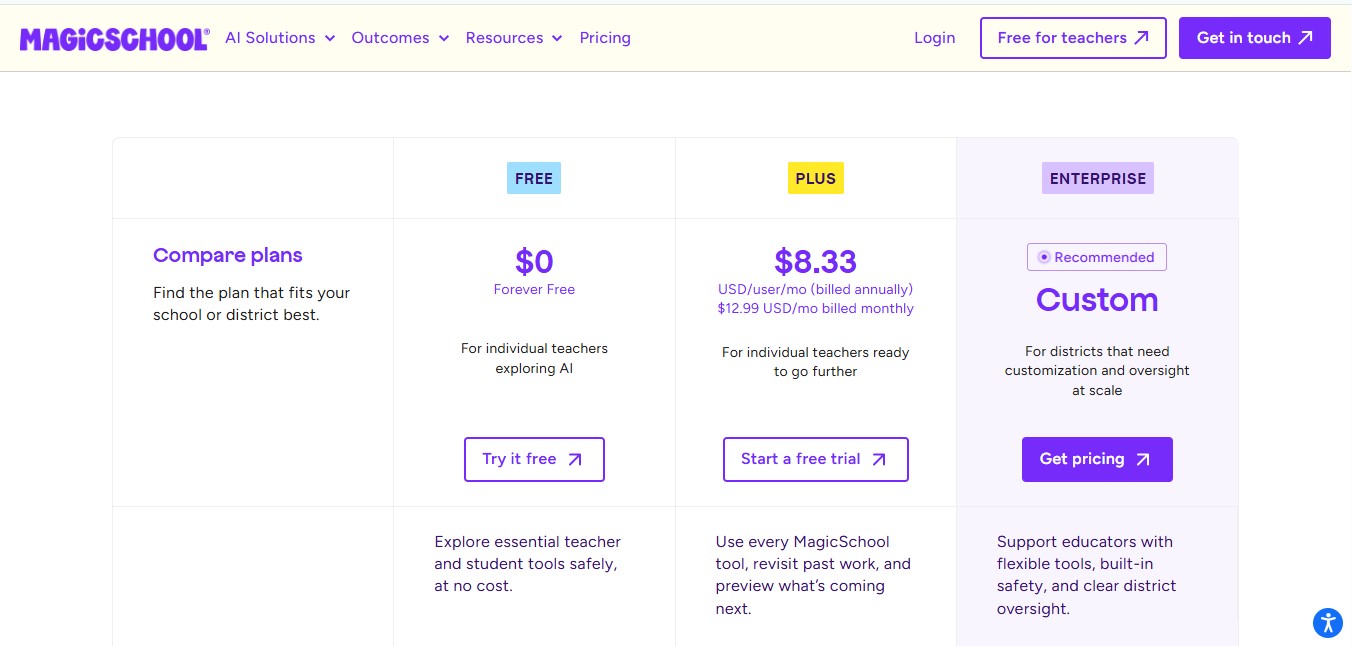
Yes — MagicSchool AI has a free plan that covers most classroom needs without a credit card, though it applies standard usage limits. Plus removes those caps.
Free | Plus | Enterprise |
|---|---|---|
$0 | $8.33/mon | Custom |
✓ 80+ teacher & 50+ student tools | Unlimited Creations | Admin dashboard |
✓ AI Assistant | unlimited output history | usage reporting |
✓ Classwork Help | More Features | full deployment support |
✓ standard usage limits |
MagicSchool AI Pros and Cons
Pros
- Completely free to start — no credit card needed
- 80+ tools built specifically for teachers
- Very easy to use — no prompt engineering skills needed
- Earns a 95% privacy rating from Common Sense Privacy — one of the highest rated AI platforms for data protection
- Works with Google Classroom, Canvas, and Schoology
- Available in 30+ languages
- Has a dedicated student platform called MagicStudent
Cons
- Initial learning curve due to the vast number of tools available
- Some advanced features locked behind paid plan
- Teachers who already use ChatGPT confidently may find MagicSchool’s template structure somewhat restrictive
- Occasional minor glitches reported by some users
How to Get Started with MagicSchool AI — Step by Step
- Go to magicschool.ai
- Click Sign Up Free
- Create your account with your school email
- Select your grade level and subject
- Browse the tools dashboard and pick a tool to try
- Enter your details and let MagicSchool generate your content
- Review, edit, and use in your classroom
The whole setup takes less than 5 minutes.
MagicSchool AI Certification
MagicSchool also offers free certification courses for educators who want to build their AI skills and learn how to use the platform more effectively.
The current educator courses include:
- Level 1 — Foundational AI Certification: Learn the basics of MagicSchool’s AI tools, educator workflows, and responsible classroom use.
- Level 2 — Intermediate AI Certification: Go further with prompting, custom tools, and AI workflows for educators.
Both courses are currently listed as free and designed to be completed in a relatively short session.
If you’re looking for professional development or want a MagicSchool credential to add to your teaching portfolio, the certification courses are worth checking out. Course availability and requirements can change, so check MagicSchool’s certification page before starting.
Want to see how it stacks up? Our guide to free AI certifications for teachers lines MagicSchool’s course up against Google’s, Microsoft’s, OpenAI’s, and Canva’s on time, cost, and what you actually get.
MagicSchool AI vs ChatGPT — Which Is Better for Teachers?
Both tools are excellent but serve different purposes.
Feature | MagicSchool AI | ChatGPT |
|---|---|---|
Build for teacher | ✓ Yes | ✕ No |
Free plan | ✓ Yes | ✓ Yes |
80+ education tools | ✓ Yes | ✕ No |
Flexible open prompting | △ Limited | ✓ Yes |
Student plateform | ✓ Yes | ✕ No |
Privacy rating | ✓ 93% | △ Lower |
Learning curve | Low | Medium |
MagicSchool AI is better for teachers who want ready-made education tools without learning how to write prompts. ChatGPT is better for teachers who want full flexibility and open-ended conversations. Many teachers use both together for best results.
Check out our guide on how to use ChatGPT to write lesson plans to learn how to combine both tools.
Who Should Use MagicSchool AI?
MagicSchool AI is perfect for:
- K-12 classroom teachers of all subjects
- Special education teachers who need IEP tools
- New teachers who want quick lesson planning help
- Experienced teachers who want to save time on admin tasks
- Schools looking for a safe, privacy-compliant AI platform
MagicSchool AI is one of the best AI tools for teachers in 2026 if your main goal is to give staff one broad, school-oriented AI platform instead of a patchwork of narrow tools.
Is MagicSchool AI Worth It?
Yes — absolutely. MagicSchool AI is one of the best free tools available to teachers in 2026. It is not a replacement for teacher expertise, but it dramatically reduces the grunt work of teaching and understands educational workflows in ways that general AI tools simply do not.
Start with the free plan, explore the tools for a week, and see how much time you save. You have nothing to lose.
Curious how it stacks up against the other big all-in-one platform? See our MagicSchool AI vs Brisk Teaching comparison.
Deciding between this and a student-facing tool? See our SchoolAI vs MagicSchool AI comparison — teacher content generation vs. supervised student chat.
Wondering how its built-in differentiation tool stacks up against a dedicated one? See our Diffit vs MagicSchool vs ChatGPT comparison.
Wondering how its AI Grader tool stacks up against dedicated grading tools? See our AI grading tools for teachers guide, including what independent research says about accuracy.
Teaching social studies specifically? See our best AI tools for social studies teachers guide for primary-source analysis and historical-figure interaction tools that go beyond general lesson prep.
Want to compare MagicSchool AI side by side against any of 100+ other AI tools? Try our AI tool comparison tool.Frequently Asked Questions
Yes, MagicSchool AI has a completely free plan that gives teachers access to 70+ AI tools with no credit card required.
Yes. MagicSchool AI has dedicated tools for writing IEPs, behavior intervention plans, and differentiated materials for students with diverse learning needs.
MagicSchool AI supports all grade levels from Pre-K through high school and beyond.