
Table of Contents
MagicSchool, Brisk, and Eduaide will write what to teach. None of them build the actual slide deck. When you need a finished, presentable set of slides — a sub plan, a back-to-school night deck, a department PD session — a different category of tool does that: type a prompt or paste an outline, and it generates a full, formatted deck in under a minute.
Four AI presentation tools for teachers now market themselves directly at educators: Gamma, Prezi, Beautiful.ai, and Alai. We tested all four against their own current pricing pages, because the marketing copy and the actual terms don’t always agree — only one of them turns out to have real, teacher-specific pricing.
Which One Actually Gives Teachers a Discount?
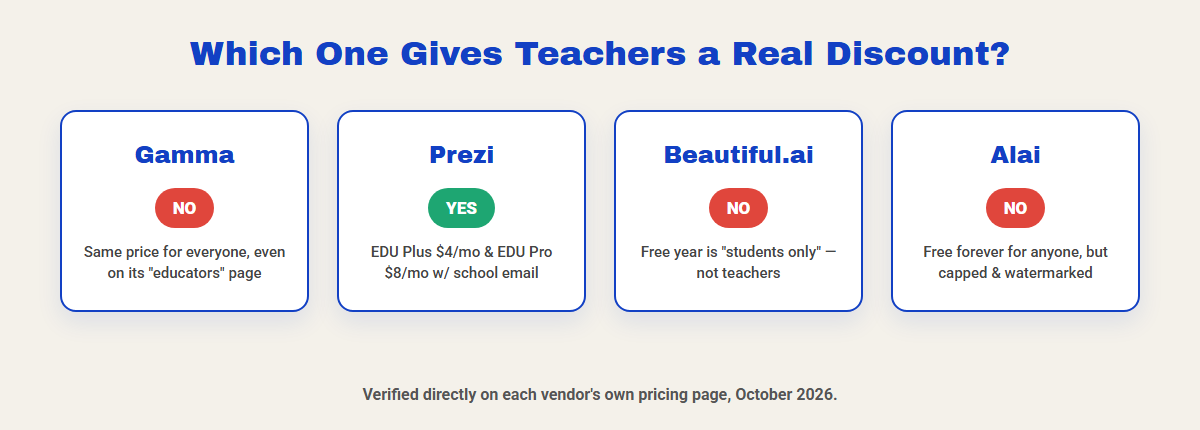
Of the four, only Prezi has a real teacher-specific discounted tier: EDU Plus at $4/month and EDU Pro at $8/month, billed annually, both requiring a verified school email address. Gamma has a dedicated “Gamma for Educators” page full of classroom-ready prompts, but its actual pricing page charges every user the same $9–$90-per-seat rates — no teacher or school discount exists despite the marketing.
Beautiful.ai’s education page talks about “students and educators” throughout, but the free-year offer itself is explicit: it’s for “new student subscribers only.” A teacher verifying a school email does not qualify — teachers pay the regular $14.50/month rate, or start a 14-day trial that requires a credit card and bills automatically if not cancelled. Alai sits in between: a forever-free tier open to anyone, not education-specific, with real caps (200–300 AI credits a month, 10 slides per prompt, watermarked output).
Gamma vs Prezi vs Beautiful.ai vs Alai at a Glance
Gamma | Prezi | Beautiful.ai | Alai | |
|---|---|---|---|---|
Free plan | $0 – 400 credits at signup, 10 slides/prompt | Basic, free, no credit card | None — 14-day trial, card required | Free forever, 200–300 credits/mo, watermarked |
Paid plan | Plus $9/seat/mo, Pro $18/seat/mo (annual) | EDU Plus $4/mo, EDU Pro $8/mo (annual) | $14.50/mo individual (annual) | Plus $20/mo, Pro $30/mo |
Teacher discount | No | Yes — real EDU pricing, school email required | Free year is students-only, not teachers | No |
Slides per prompt | 10 free, 100 on Plus+ | N/A — zoom-canvas format, not slide-by-slide | N/A — Smart Slide layouts | 10 free, 20–50 on paid |
Export | PDF, PPTX, PNG, Google Slides | PDF, PPTX, embeddable link | PDF, PPTX | PDF, PPTX |
Gamma: Fastest, Most Polished Decks From a Prompt
Type a prompt or paste an outline and Gamma generates a complete deck (or document, or website) with real layout and imagery, not just bullet points on a template. It exports to PPTX, Google Slides, PDF, or PNG, and imports existing PDF/PPTX files to work from. Gamma’s own “for Educators” landing page ships ready-made classroom prompts — a narrative-writing workshop deck, a classroom-rules deck for kindergarten, a parent-conference presentation — which is a genuinely useful starting library if you’ve never written an AI slide prompt before.
The free plan gives you 400 credits at signup and caps each generation at 10 slides per prompt; Plus ($9/seat/mo annual) removes the Gamma watermark and raises that to 100 slides per prompt. There is no discounted rate for teachers or schools listed anywhere on Gamma’s own pricing page — the educator-focused content is marketing, not a different price.
Prezi: The Only One With Real Teacher Pricing
Prezi’s pricing page has a dedicated “Students & Educators” tab, separate from its individual and business tabs, and it actually charges less there: EDU Plus runs $4/month and EDU Pro $8/month, both billed annually, both requiring a valid school email address to activate. EDU Pro adds “exclusive online training and analytics to track progress in your class” on top of the AI generator. A free Basic tier exists too, with no credit card required, for trying the format before paying anything.
One real structural difference worth knowing before you pick Prezi over the other three: its signature format is a zoomable, non-linear canvas rather than a traditional slide-by-slide deck. Prezi AI can still generate a standard linear presentation, but the platform’s whole design language is built around the pan-and-zoom format, which has a slightly steeper learning curve than clicking through flat slides.
Beautiful.ai: Marketed to Teachers, Priced for Business
Beautiful.ai’s 300+ Smart Slide layouts auto-align, auto-resize, and auto-animate content, so a deck stays visually consistent even when you’re editing fast — genuinely strong design output, and its education landing page is built around the phrase “students and educators.” But read the actual offer and the gap shows: the free annual Pro subscription is stated plainly as being “for new student subscribers only,” verified with a .edu email. A classroom teacher verifying a school email does not qualify for it.
Without that student offer, a teacher’s options are the regular $14.50/month individual Pro plan (billed annually) or a 14-day free trial that requires a credit card up front and bills automatically the moment the trial ends if you forget to cancel. If a school or district is already paying for Beautiful.ai’s Team plan ($40–50/user/mo) for staff training decks, this is worth using — but as an individual teacher shopping for a free or cheap option, it’s the weakest of the four here.
Alai: Free Forever, But Capped Hard
Alai’s free tier never expires — no trial clock, no credit card — but it’s capped on every dimension that matters for regular use: 200–300 AI credits a month, a 10-slide ceiling per generated prompt, and a visible watermark on every exported slide. Paid tiers lift those caps and remove the watermark: Plus ($20/mo) allows 20 slides per prompt, Pro ($30/mo) allows 50, and Ultra ($80/mo) adds the highest usage ceiling and direct access to the founders for feature requests. Nothing on Alai’s own pricing page mentions a teacher or school discount.
Alai is a reasonable way to test whether the prompt-to-deck workflow actually fits how you plan, before committing money to Gamma or Prezi — just budget for the watermark showing up on anything you’d want to hand a parent or print for a bulletin board.
The Free Baseline You Might Already Have
Before paying for any of the four tools above, check what’s already sitting in your school’s existing accounts. Google Slides’ built-in “Help me create” feature (powered by Gemini) generates a basic deck from a prompt directly inside Slides, at no extra cost, for any Google Workspace account — and most US schools already run Google Workspace for Education. Canva for Education does the same with Magic Design, free for verified K-12 teachers, with Canva’s own design templates layered on top of the AI draft.
The paid tools in this guide earn their price on speed and polish for the bigger, one-off moments — a formal observation, a back-to-school night, a department PD session — not on replacing the free option for routine daily slides.
Which One Should You Actually Pick?
Tightest budget, real teacher discount: Prezi EDU Plus or EDU Pro — the only genuinely teacher-priced option of the four.
One big, polished one-off deck: Gamma, even at full price, for the design quality and the educator prompt library.
Already paying for Canva or Google Workspace: skip all four and use what’s already free — Canva Magic Design or Google Slides’ Gemini feature covers routine slides without a new subscription.
Skip as an individual teacher: Beautiful.ai, unless your school already pays for its Team plan — the advertised free year genuinely does not apply to teachers, only verified students.
Frequently Asked Questions
Yes — Prezi’s Basic tier is free with no credit card required, and Google Slides’ built-in Gemini feature plus Canva for Education’s Magic Design are both free and likely already available through your school account.
No. Gamma has a dedicated page of classroom-ready prompts for educators, but its pricing page charges the same $9–$90-per-seat rates to everyone — no teacher or school discount is listed anywhere on the site.
No. Beautiful.ai’s free annual Pro offer is stated as being for “new student subscribers only,” verified with a .edu email. Teachers pay the regular $14.50/month rate or start a 14-day trial that requires a credit card and bills automatically.
MagicSchool and Brisk write lesson content — plans, explanations, feedback. The tools in this guide generate the visual slide deck itself. Many teachers use both: write the lesson in one, then turn it into a deck in Gamma or Prezi.
Prezi’s EDU Teams plan ($19/month per user) and Gamma’s Business tier both include admin and analytics features built for a group. Beautiful.ai’s Team plan is priced for general business use ($40–50/user/month) rather than around a teacher discount.
One Response