Table of Contents
Most AI tools a teacher tries were never approved by anyone. You find one, click “Sign in with Google,” and ten minutes later it is on the projector with a student’s name in the prompt. This AI tool student privacy checklist is for that moment. It takes about ten minutes, needs no legal background, and ends with one of three answers: use it with students, use it for your own planning only, or leave it alone.
It is a teacher’s screening tool, not legal advice, and your district’s own rules always come first. I have not audited any vendor named below. Everything attributed to a company is what its own pages said when I read them in October 2026, and those pages change.
Why a ten-minute check is worth it
No US federal law bans AI tools in classrooms. What the laws do is set conditions on student data, and three come up again and again. According to K-12 Dive’s summary of Future of Privacy Forum guidance, FERPA governs access to education records and limits when schools can share them, COPPA limits how for-profit operators collect personal data from children under 13, and PPRA lets parents review instructional materials and restricts collecting certain sensitive information. The same piece notes more than 128 state student privacy laws, which often add their own rules for sharing data with vendors. That is why the answer in one state can differ from the answer in the next.
Two details matter most for a teacher with a free account:
- COPPA and schools. The FTC’s COPPA FAQ says a school can consent on a parent’s behalf only when the service is used for the school’s educational purposes and no other commercial purpose. If the company uses student data for its own commercial ends, such as targeted advertising, it has to get parental consent directly. The FTC also amended the COPPA Rule on April 22, 2025.
- FERPA and vendors. A vendor can receive student records under the “school official” exception in 34 CFR 99.31 when it performs a function the school would otherwise do with its own staff and is under the school’s direct control over how the records are used and maintained. In practice that control comes from a contract. See the Future of Privacy Forum’s explainer, Who Exactly IS a “School Official” Anyway?.
The takeaway: you cannot sign that contract, and a sign-up box is not one. Your job is to find out whether someone with the authority to sign has done it, and to spot tools that obviously fail before a student types anything in.
Step one: find out whether your district already decided
Before you read a single privacy page, ask your tech coordinator or building administrator whether the tool is on an approved list, and whether there is a request form. The Future of Privacy Forum’s generative AI vetting checklist (published April 2024) recommends adding AI questions to a school’s existing ed-tech vetting rather than inventing a separate process. If your district has a process, it is the one that counts, and the rest of this checklist is only useful for deciding what to request.
If the tool is approved, use the district’s version. A free personal account and a district account of the same product can run under different terms, so do not assume the approval covers the account you already made.

The AI tool student privacy checklist: five questions
If the tool is not approved yet, these five questions cover the ground that matters most. They also line up with what the Future of Privacy Forum highlights: whether the vendor trains its model on student information, and how the tool will be used with student data. The photo below shows the five checks as a one-page list you can copy onto your own whiteboard or a sticky note.
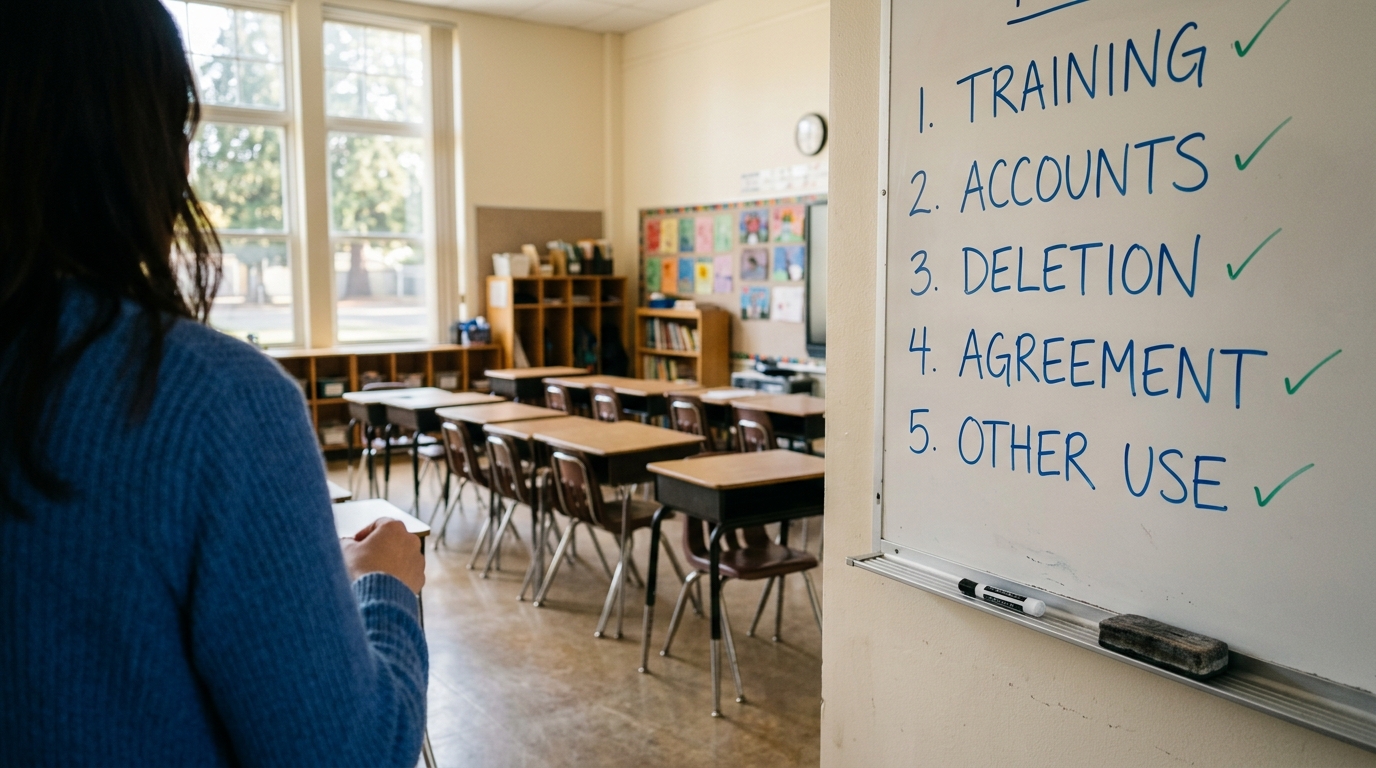
1. Does it train on student data?
Look for a plain statement about model training. “We never sell your data” is a different promise. A tool can avoid selling data and still use student prompts to improve its models. If the policy does not mention training, treat that as a gap, not as a no.
2. Who owns the student account?
The safest setup is a school-managed account or a class link that you control, with no personal email sign-ups. Check the minimum age in the terms too. If a tool says it is for users 13 and older, it is not a tool for your fourth graders, however helpful it looks.
3. When is the data deleted?
You want a stated retention period and a way for the school to ask for deletion. “Kept for as long as necessary” with no number and no process is a yellow flag, not a deal breaker, if the other four answers are strong.
4. Is there a signed agreement and a sub-processor list?
This is the contract piece from the FERPA section above. Look for a data privacy or data protection agreement the school can sign, and a list of the other companies that touch the data, such as hosting providers and the AI model provider behind the tool. If the only thing you can find is a badge, ask for the document behind it.
5. Is student data used for anything outside the classroom?
This is the COPPA question. Student data should serve the classroom, with no advertising and no profiling for other products. A privacy policy that reserves broad rights to use “user content” for “marketing” or “product development” is not written with students in mind.

What the answers look like on real vendor pages
Three examples show how uneven the answers are. Both come from pages I read in October 2026, and both are the vendors’ own statements, not independent verification.
MagicSchool. Its student data policy covers children’s data, not teacher data. It says MagicSchool does not use children’s personal information to train or improve AI or machine learning models for general, commercial or non-educational purposes, and that its AI providers cannot retain student personal data or train on data from the platform. It also says student personal data is deleted or returned within 60 days after a school or district contract ends, with written certification on request, and that it keeps a public sub-processor list. One careful reading point: the training commitment is limited to non-educational purposes, so a district that wants a flat “no training of any kind” should ask. For the product itself, see our MagicSchool AI review.
SchoolAI. Its data privacy page shows FERPA and COPPA “compliant” badges and a SOC 2 Type 2 badge, and links to a data protection addendum and a children’s privacy notice. When I read the page itself, it did not answer the training question. That answer would be in the linked documents or from the company directly. Our SchoolAI review covers how the tool works in a classroom.
Brisk Teaching. Its privacy and security FAQ gives the most concrete answers of the three. It says user input is not used to train any AI models, that it stores teachers’ prompts and the outputs it generates but not the underlying student work such as essay text, and that accounts are deleted automatically after 18 months of inactivity, with deletion available to schools on request. It describes itself as acting as a “school official” under FERPA, says it collects data from students under 13 only at the school’s direction, and says it has signed the National Data Privacy Agreement in 25 states, with a sub-processor list that includes Amazon Web Services. Two caveats from the same page: if a teacher types a student’s name into a prompt, that name is stored, and the page does not clearly say whether prompts sent to its language models are shared with those model providers, so the sub-processor list is where to look. For states without a state agreement, Brisk says it is “open to” district-level agreements, which is not a guarantee. Our Brisk Teaching review covers the product.
The lesson is the same for all three. A badge tells you a claim exists. It does not answer your five questions, and the wording of the actual policy decides what you are agreeing to. The Consortium for School Networking (CoSN) publishes guidance on building a privacy and security vetting program if your school wants something more formal than a teacher’s checklist.
Red flags and what to do about them
What you see | What it usually means | What to do |
|---|---|---|
No page about student data at all | The vendor has not thought about school use | Keep students out of it |
Privacy policy covers only website visitors | Classroom use is not covered by the terms | Ask for the education terms before using it |
Silence on model training | You cannot tell whether prompts are reused | Ask in writing, or use it for teacher-only tasks |
Students sign up with personal email | No school control over the accounts | Use only teacher-managed accounts or class links |
Age limit above your students’ age | The tool is not built for them | Do not use it with those students |
Compliance badges with no document | A claim without a contract behind it | Ask for the DPA and sub-processor list |
Free personal terms differ from school terms | Your approval may not cover your account | Check which version your district approved |
If your district has no process
Many schools are still working this out, so you may get no clear answer. These steps keep you on the safer side while you wait:
- Use the tool for your own planning first. Drafting a rubric or a reading passage needs no student information at all.
- Keep student identifiers out of prompts. No names, IDs, grades, behavior notes or support-plan details. Remove names from student work before you paste or upload it.
- Demonstrate instead of assigning. A teacher-led demo on the projector, with no student logins, is a much smaller step than having 28 students create accounts.
- Write down what you checked. Note the date, the pages you read and the five answers. Policies change, and a dated note helps when an administrator asks.
- Send your administrator the checklist. The Future of Privacy Forum’s checklist above is built for exactly this request.
Your classroom rules matter here too. Our AI use policy template covers what students may do with AI, and the AI companion chatbot safety guide covers a risk this checklist does not: chatbots students may use on their own. For the state-by-state picture, see AI literacy laws for schools, and for how free and paid versions of tools differ, see free vs paid AI tools for teachers.

What this checklist cannot tell you
- It cannot verify what a vendor actually does. It tells you what the company says. Only an audit, a signed contract or a security report shows more.
- It does not replace your district. If your district says no, the answer is no, however clean the privacy page looks.
- The law varies by state. The 128-plus state laws mentioned earlier mean a tool that passes in one state may need extra terms in another.
- Pages change. Everything above was true of the pages I read in October 2026. Check the date on any policy you rely on.
- It says little about teacher data. The MagicSchool policy above, for example, addresses students, not teachers.
Frequently Asked Questions
No. FERPA is a law that applies to schools that receive federal funds. Vendors get access to student records through the school, and the contract is what governs it. A badge is the vendor’s own statement about itself.
It is a smaller risk when you run it yourself and no student information goes in, but you still have to follow your district’s rules about which tools staff may use.
SchoolAI says it is compliant with both and shows badges for them, along with a SOC 2 Type 2 badge. Those are its own statements. Ask for the signed data protection addendum and the sub-processor list, and let your district decide. Our SchoolAI review covers the product.
Brisk’s own FAQ gives specific answers: no training on user input, deletion after 18 months of inactivity, and signed state agreements. Names typed into prompts are stored, though, and which agreement covers your school depends on your state and district. Ask your privacy officer before students use it.
For any tool where students log in or where student information goes into a prompt, yes. For a teacher-only planning tool with no student data, a quick look at the training and retention terms is usually enough. Our guide to the best AI tools for teachers is a good starting list of tools worth checking.
Which AI tool is your school trying to approve right now? Tell us in the comments and I will help you run it through these five checks, or read our free AI use policy template for what to put in writing once you have an answer.