Yes — NotebookLM is a genuinely free, genuinely useful AI tool for teachers, and as of July 2026 it has a new name: Gemini Notebook. Same product, same team, just a rebrand as Google folds it deeper into the Gemini ecosystem.
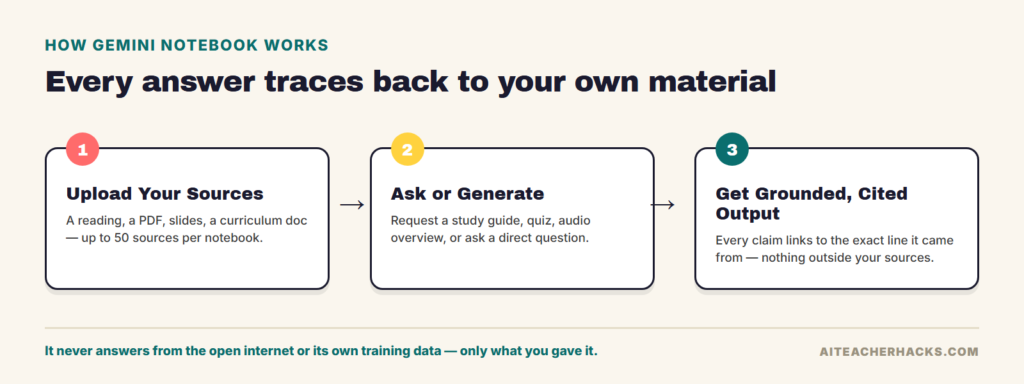
What makes it different from ChatGPT or the regular Gemini chatbot is the one thing that matters most for classroom use: it only answers from the documents you actually upload. Paste in a reading, a set of notes, a textbook chapter, or a curriculum PDF, and every answer, summary, or quiz it generates is grounded in those sources — not the open internet, and not its own training data. That’s why it shines once you already have material to feed it — a textbook chapter, a set of readings, last year’s unit plan — rather than starting from a blank page (for that, a general assistant like ChatGPT or Gemini is the better fit).
This review covers what it actually does for teachers, what changed (and didn’t) in the July 2026 rename, current pricing, honest limitations, and how it compares to Gemini and ChatGPT.
Table of Contents
What Actually Changed in the July 2026 Rename
Gemini Notebook is Google’s source-grounded AI notebook. You upload documents, links, PDFs, slides, or audio, and it becomes a private AI assistant that only knows what you gave it — then generates study guides, summaries, quizzes, and even podcast-style audio discussions from that material, with every claim traceable back to the source.
On July 16, 2026, Google renamed it from NotebookLM to Gemini Notebook. Josh Woodward, VP of Google Labs, confirmed it’s the same standalone product, just more deeply connected to the rest of Gemini — nothing was removed, existing notebooks and Audio Overviews carried over untouched, and pricing didn’t change. If you’ve used NotebookLM before, you already know how this works; the URL and branding are what’s different.
How Teachers Actually Use It
Source-Grounded Study Guides, Quizzes, and Video Walkthroughs
Upload a reading, a chapter, or a set of notes, and Gemini Notebook can generate a study guide, FAQ, timeline, or quiz built entirely from that material. Because it’s restricted to your uploaded sources, it won’t invent facts that aren’t in the reading — a real advantage over asking a general chatbot to “make a study guide about photosynthesis,” which pulls from wherever the model’s training data happens to land.
Alongside written study guides, it can generate Video Overviews (narrated slide-style walkthroughs of your material) and interactive mind maps that visually break a topic into its component ideas — useful for visual learners or as a quick review before a test.
Every answer links back to the specific line or paragraph in your uploaded source it came from — click the citation and it jumps straight to that spot. This is the core reason it’s considered safer for classroom use than a general chatbot: you’re not trusting the AI’s memory, you’re checking its work against material you already vetted.
Audio Overviews: Turn Readings Into a Podcast
This is the feature most teachers mention first. Audio Overview takes whatever you’ve uploaded and turns it into a podcast-style conversation between two AI voices that summarize, banter, and explain the material out loud — genuinely useful for auditory learners, long car-ride review, or students who struggle with dense text.
The free plan includes 3 Audio Overviews per day; Plus doubles that to 6.
Google Classroom Integration
Since late September 2025, Gemini Notebook has been available directly inside Google Classroom. Teachers can create and assign notebooks straight from the Classwork tab, and students interact with the teacher-selected source material once admin-enabled access is turned on.
Age access differs by account type: a personal Gemini Notebook account generally requires being 13 or older (or your country’s applicable age of consent), while Google Workspace for Education supports users of all ages once a school administrator enables the service. If you’re planning to have students use it directly, check with your school’s IT admin about Workspace access rather than assuming the personal signup rules apply.
On privacy: for school (Workspace for Education) accounts, Google says uploads, chats, and generated outputs aren’t reviewed by human reviewers or used to train its generative AI models, and are handled under the Workspace for Education privacy terms. That’s worth knowing, but schools should still follow their own data-use policies rather than treating it as a blanket guarantee.
What's New Since the Rename: Code Execution and Data Analysis
The July 2026 update that came with the rename added a real capability, not just a new name: notebooks can now run code in a secure cloud computer to do actual data analysis grounded in your uploaded sources, instead of only summarizing them. Google rolled this out in stages — starting with AI Ultra and select Workspace users, then expanding to Pro — so don’t be surprised if it isn’t on your free account yet. For a teacher this is more useful for building a gradebook analysis or a data-literacy lesson than day-to-day lesson prep, but it’s a meaningful upgrade from the old NotebookLM.
Gemini Notebook Pricing — What Is Actually Free?
Gemini Notebook has a genuinely usable free plan — you don’t need to pay to get real value from it. The paid tier exists for teachers who hit the daily limits regularly, not because the free plan is crippled. Prices below are current U.S. pricing; Google’s local pricing can vary by country.
Plan | Price | What You Get |
|---|---|---|
Free | $0 | 100 notebooks, 50 sources each, 50 chats, 3 Audio Overviews/day, 3 Video Overviews/day — every core feature included |
Google AI Plus | $4.99/month | 200 notebooks, 100 sources each, 200 chats/day, 6 Audio + 6 Video Overviews/day, 400GB storage across Gmail/Drive/Photos |
Google AI Pro | $19.99/month | Higher limits across the board, plus broader Gemini app access |
Google AI Ultra | From $99.99/month | 20TB+ storage and the highest limits — built for power users, not typical classroom use |
What this means practically: the key takeaway from Google’s own pricing rollout is that the free plan is genuinely enough for most teachers — the paid tiers exist for volume, not for locked features. Every core capability (Audio Overviews, source-grounded answers, citations) is available for free; you’re only paying to raise the daily caps.
Note this is separate from your school’s Google Workspace for Education plan, which may bundle a different set of Gemini features at the institutional level. If your district already provides Google AI Pro or Plus through Workspace, check with your IT department before paying for a personal subscription.
Gemini Notebook Pros and Cons for Teachers
Pros
- Genuinely free plan with real daily capacity, not a crippled trial
- Answers are grounded in your own sources — low hallucination risk compared to a general chatbot
- Audio Overview turns any reading into a podcast-style summary, useful for review and accessibility
- Built into Google Classroom, so no separate login for schools already on Google Workspace
- Citations link straight back to the exact passage, making fact-checking fast
Cons
- Only as good as what you upload — it can’t research a topic from scratch the way ChatGPT or Gemini can
- Personal account signup generally requires being 13 or older (or your local age of consent); younger students need Workspace for Education access enabled by a school admin
- The July 2026 rename adds a layer of search confusion — older guides and bookmarks still say “NotebookLM”
- Daily limits on the free plan (3 Audio Overviews, 50 chats) can feel tight during exam season
What Gemini Notebook Still Cannot Do
It cannot browse the open internet for you the way a search-connected chatbot can — if you don’t upload it, it doesn’t know it. It also isn’t a lesson-planning tool in the way MagicSchool AI or Eduaide are; it doesn’t generate a lesson plan from a grade and topic alone, it needs source material to work from first. And it isn’t a grading tool — there’s no rubric-based feedback feature the way Brisk Teaching has.
Gemini Notebook vs Gemini vs ChatGPT — What's the Difference?
The naming overlap between “Gemini Notebook” and the regular Gemini chatbot app trips people up, understandably. They’re related but built for different jobs.
Feature | Gemini Notebook | Gemini (chatbot) | ChatGPT |
|---|---|---|---|
Best for | Turning your own documents into study guides, summaries, podcasts | Fast general answers, brainstorming, quick drafts | General-purpose chat, writing, brainstorming |
Answers grounded only in your uploaded sources | ✓ Yes | ✗ No | ✗ No |
Audio Overview (podcast-style summary) | ✓ Unique feature | ✗ No | ✗ No |
Free plan | ✓ Yes | ✓ Yes | ✓ Yes |
Built into Google Classroom | ✓ Yes | ✓ Yes (Gemini in Classroom) | ✗ No |
Generates a lesson plan from scratch | ✗ No — needs source material first | ✓ Yes | ✓ Yes |
Best when | You have specific readings or documents to teach from | You want a fast answer with no setup | You want the most widely used general assistant |
The simplest way to think about it: use Gemini Notebook when you already have the material and want AI help built from it. Use regular Gemini or ChatGPT for lesson planning when you’re starting from nothing and need a first draft. Most teachers end up using both, for different parts of the same week.
Is Gemini Notebook Worth It for Teachers?
Yes, for the specific job it does well. If you regularly work from real class materials — readings, past unit plans, curriculum documents — and want AI help that stays grounded in what you actually gave it, Gemini Notebook’s free plan is worth setting up today. It won’t replace a general assistant like ChatGPT or Gemini for open-ended tasks, but it isn’t trying to.
The rename from NotebookLM is cosmetic. If you were waiting to see whether the name change meant something changed under the hood, it didn’t — the core tool works exactly as it did before, just with a couple of genuinely useful additions.
Teaching science specifically? See our best AI tools for science teachers guide for virtual labs and simulations that go beyond what NotebookLM covers.
Frequently Asked Questions
As of July 16, 2026, Google renamed it to Gemini Notebook. It’s the same product — existing notebooks, sources, and Audio Overviews carried over untouched, and pricing didn’t change. Most people still search for it as “NotebookLM,” so both names work.
Yes. The free plan includes 100 notebooks, 50 sources each, 50 chats and 3 Audio Overviews per day — genuinely enough for regular classroom use. Paid tiers exist to raise those daily limits, not to unlock features.
A personal Gemini Notebook account generally requires being 13 or older (or your country’s applicable age of consent). Younger students can still use it through Google Workspace for Education, which supports all ages once a school administrator enables the service — teachers can assign notebooks directly through Google Classroom.
They do different jobs. Gemini Notebook only answers from documents you upload, which makes it safer for working with real class material. ChatGPT is better for open-ended tasks with no source material — most teachers end up using both.