Math teaching has a specific AI problem that most general teacher tool guides completely ignore.
General AI tools make math errors. They generate problems with wrong answers, cite standards codes that do not exist, and produce word problems with impossible numbers. A worksheet with a calculation error is worse than no worksheet at all — it teaches students the wrong thing and damages your credibility.
The best AI tools for math teachers in 2026 are not the same as the best AI tools for English or social studies teachers. Math instruction requires tools validated for mathematical accuracy, proper notation, standards-aligned difficulty progression, and the critical distinction between tools that give students answers versus tools that build genuine mathematical understanding.
This guide covers what actually works — from lesson planning and problem generation to student tutoring and grading — with honest limitations for every tool.
Table of Contents
The Math Teacher's AI Problem — Why Generic Tools Fall Short
Before diving into specific tools, this context matters.
Math instruction has requirements that general-purpose AI education tools do not always meet: mathematical accuracy, problem diversity and quality, differentiation capability, and assessment analytics.
Large language models are flexible but weak in math accuracy. They provide quick explanations, generate practice problems, and explain concepts. The problem is reliability — they often create incorrect answers or flawed steps.
The practical implication for math teachers: always verify AI-generated math problems before distributing them to students. Every tool on this list has this limitation to some degree. The tools that manage it best do so through specialized validation layers — not by using a more powerful underlying AI model.
A nationally representative RAND survey of more than 9,000 K-12 teachers found that 21% of math teachers already use AI tools for instructional planning or teaching. The teachers getting the most value are those using purpose-built math tools — not general chatbots awkwardly adapted for math.
Tool | Best For | Free Plan |
|---|---|---|
MagicSchool AI | Lesson Planning | △ Limited |
Khan Academy + Khanmigo | Student Tutoring | ✓ Yes |
Desmos | Graphing & Visualization | ✓ Yes |
GeoGebra | Geometry | ✓ Yes |
Gradescope | AI-Assisted Grading | △ Limited |
Snorkl | Math Reasoning Assessment | △ Limited |
Photomath | Homework Support | ✓ Yes |
Diffit | Word Problem Differentiation | ✓ Yes |
1. MagicSchool AI — Best All-in-One Platform for Math Teachers
MagicSchool AI stands out for US K-12 math teachers in 2026 — not because it has the most sophisticated math engine, but because it packs the most useful math-specific teacher tools into one free platform.
Math-specific features most teachers do not know about:
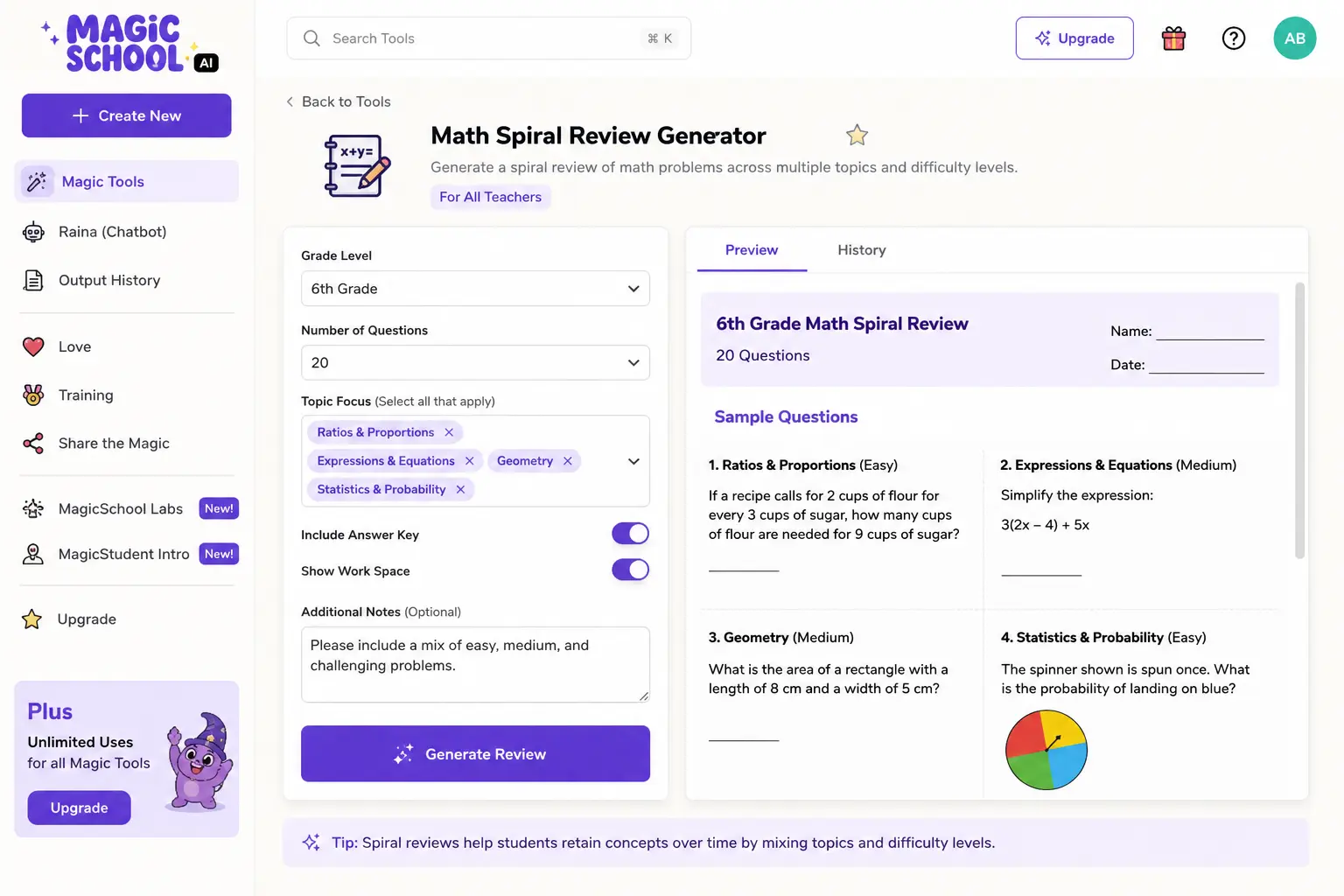
MagicSchool features a Math Spiral Review Generator designed to provide review materials for various math topics — a practical tool for students preparing for exams or revisiting past topics. The Math Story Word Problem tool lets teachers input a problem and the platform generates a contextual word problem puzzle for students. The Table Analysis Generator creates data tables with associated questions that students analyze in assignments.
What makes it genuinely useful for math:
- Spiral review generation saves hours of review material creation per unit
- Word problem generator creates real-world context for procedural skills
- Rubric generator for math assessments and projects
- Differentiated problem sets for mixed-ability classrooms
- IEP accommodation suggestions for math learning disabilities
Critical honest limitation: MagicSchool does not feature an advanced LLM, which makes it more prone to math errors than dedicated computational tools. Always verify generated problem answers before distributing to students — especially for multi-step problems and higher-level content.
Pricing: Free plan covers all core math tools. Read our full MagicSchool AI review for the complete breakdown.
2. Khan Academy + Khanmigo — Best for Student Math Tutoring
For the student-facing side of math instruction, nothing in 2026 matches the Khan Academy ecosystem for K-12 math.
Khan Academy’s mastery-based progression system means students cannot skip ahead without demonstrating understanding. The teacher dashboard shows exactly where each student is struggling.
Khanmigo for math specifically:
Khanmigo is best for ages 6 to 14 with structured, curriculum-aligned lessons, mastery badges, and Socratic guidance that builds genuine understanding.
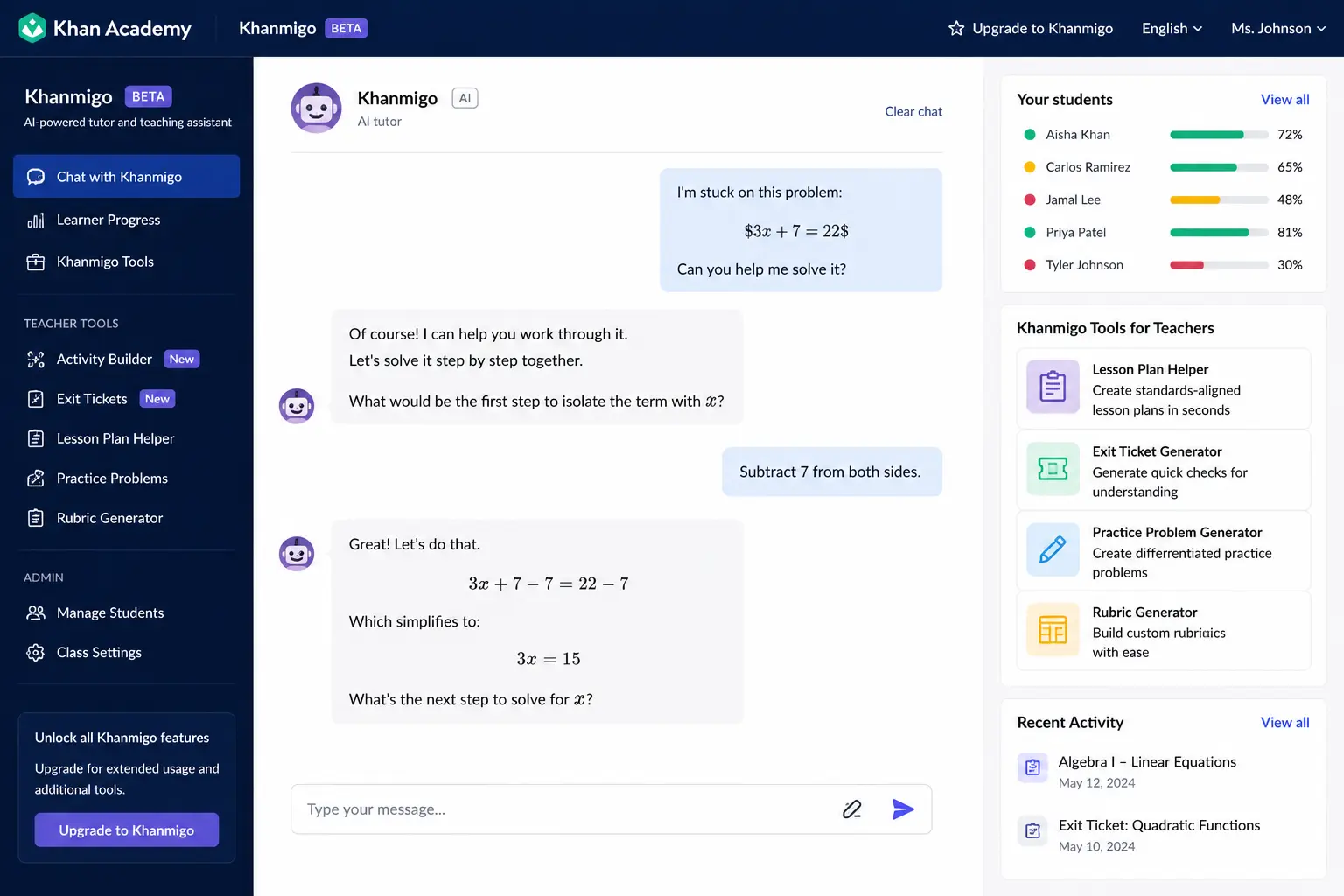
Khanmigo functions as both a student AI tutor and a teacher AI assistant — it generates Socratic questions for any math topic, helps plan lesson hooks, and provides differentiated hints when students are stuck without giving away answers.
The academic integrity advantage for math:
Khanmigo’s Socratic approach is especially valuable in math because it guides students through problem-solving steps rather than giving them answers. A student who asks “What is 3x + 7 = 22?” gets guided questions, not the answer. This is the correct pedagogical approach for building genuine mathematical fluency.
Read our full Khanmigo review for the complete breakdown.
Pricing: Free for teachers. $4/month for students.
3. Desmos — Best Free Graphing and Visualization Tool
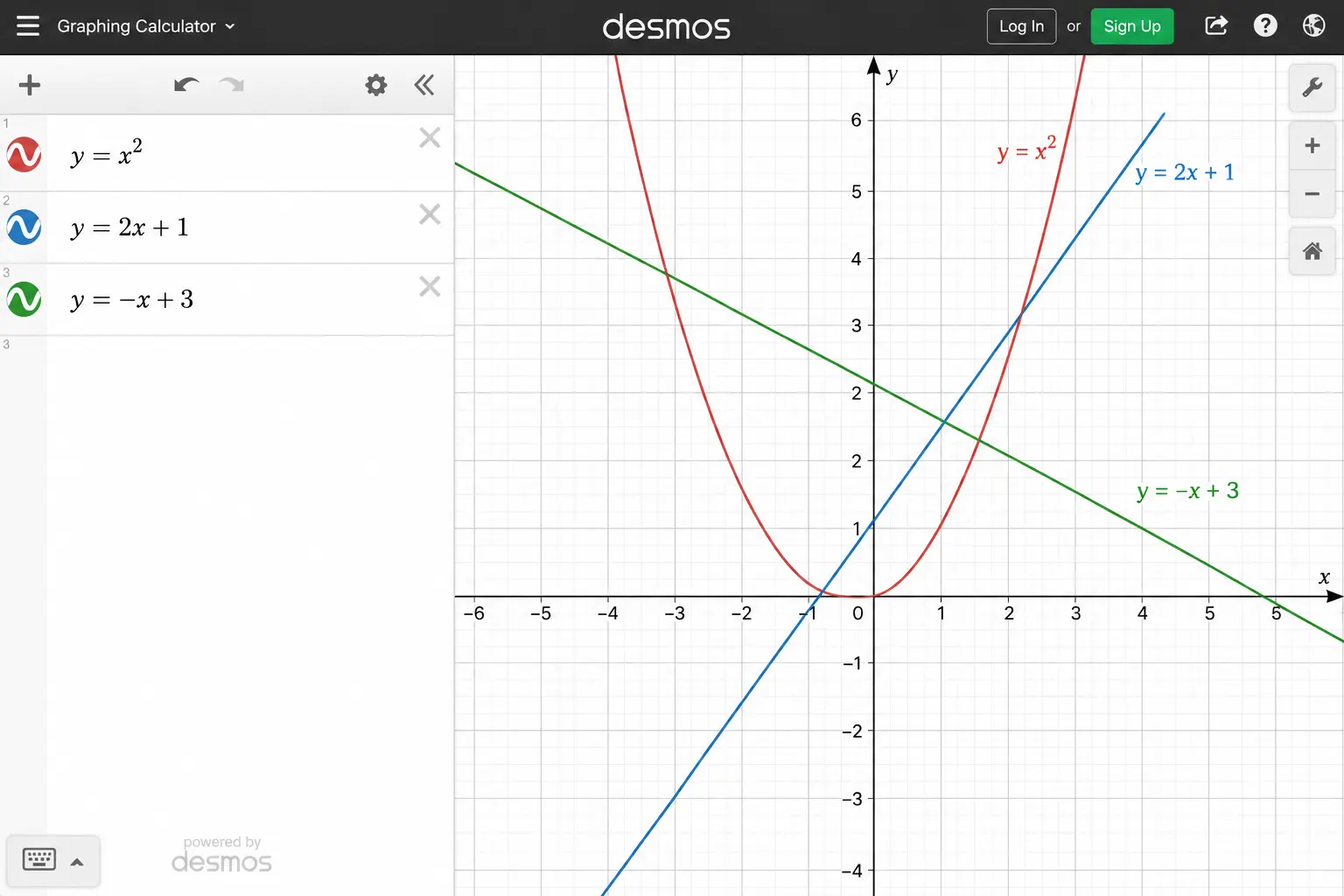
Desmos is the best free graphing and visualization tool for math teachers in 2026. It is not an AI tool in the traditional sense — but it has added AI-assisted activity creation features that make it genuinely relevant in 2026.
Why Desmos belongs in every math teacher’s toolkit:
- Free graphing calculator that works on any device including Chromebooks
- Interactive activity builder for teacher-created digital math lessons
- Desmos Classroom — assign interactive activities to students with real-time progress tracking
- Geometry tool for construction and exploration
- Scientific calculator and four-function calculator for testing contexts
For visualization specifically: No AI tool generates better graphical representations of mathematical functions than Desmos. For algebra, calculus, statistics, and geometry — Desmos is the visual layer that makes abstract concepts concrete.
Pricing: Free for teachers and students. Always.
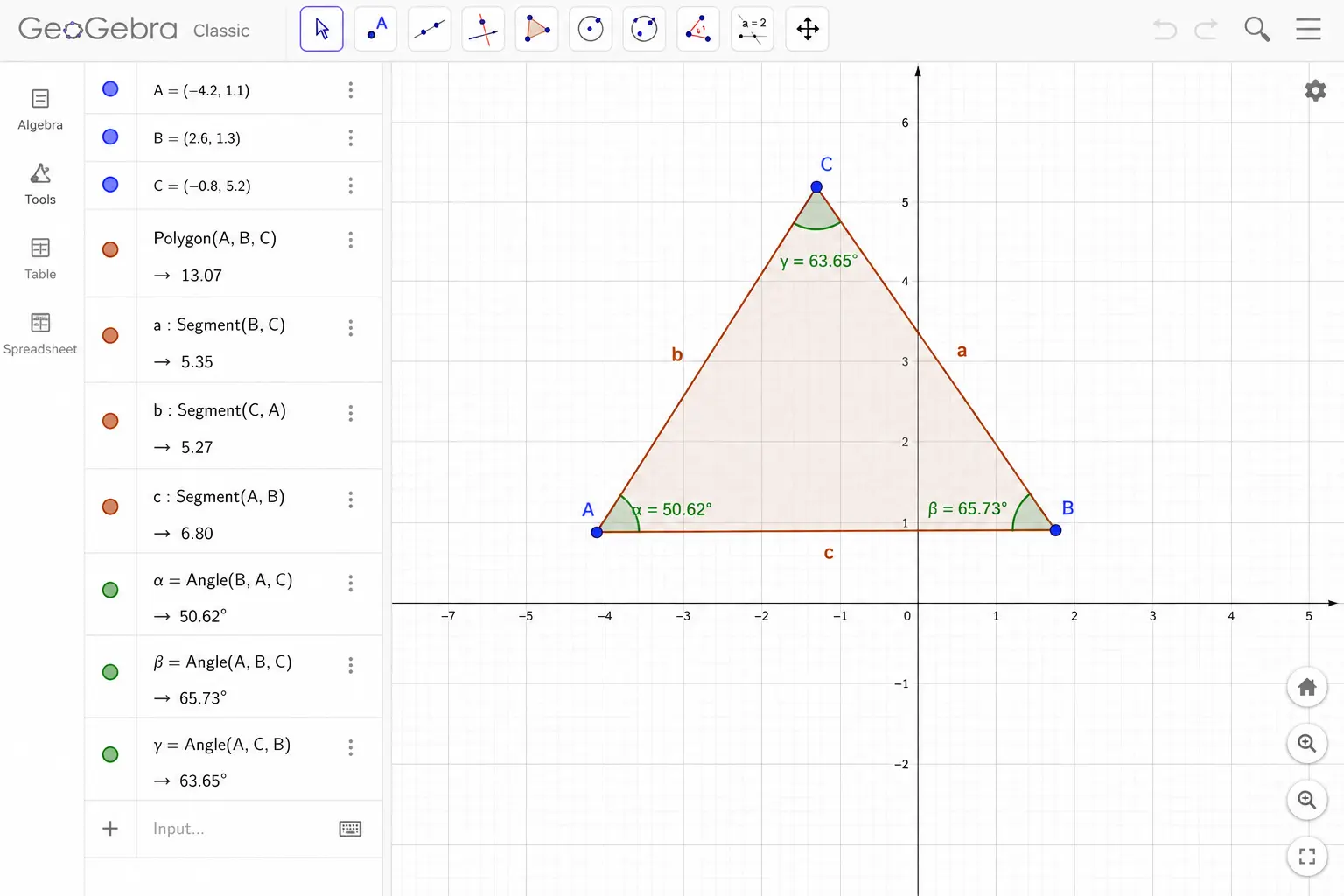
4. GeoGebra — Best for Geometry and Dynamic Math Exploration
GeoGebra’s strength is geometric construction and dynamic exploration. What it does: dynamic math software for geometry constructions, function graphing, statistics, and 3D modeling — with classroom activity sharing.
Why math teachers specifically need GeoGebra:
- Students can drag points, lines, and shapes to explore geometric relationships dynamically
- Pre-built classroom activities across all grade levels available in the GeoGebra resource library
- 3D graphing for pre-calculus and calculus teachers
- Statistics tools for data analysis units
- Works on any device — no installation required
For geometry teachers specifically: GeoGebra is the most powerful free tool available in 2026. The dynamic construction environment lets students discover theorems rather than just memorize them — a genuine pedagogical advantage over static worksheets.
Pricing: Free. Always.
5. Gradescope — Best for Math Grading at Scale
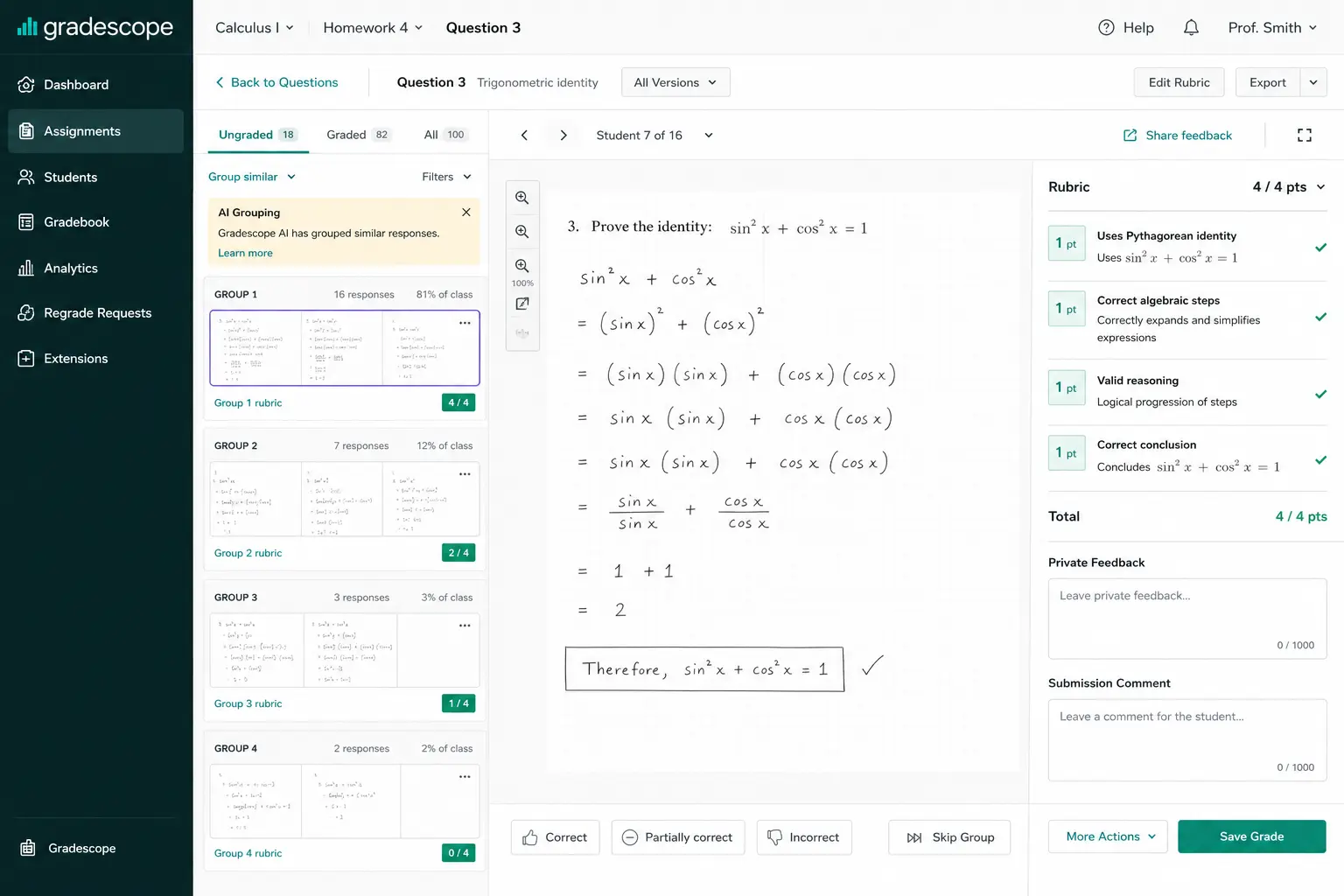
Math grading is unique — equations, diagrams, handwritten work, and multi-step procedures that cannot be auto-graded by standard LMS tools.
Gradescope is the most powerful AI grading tool available to teachers in 2026 for math and science. Students submit work digitally or teachers scan physical work. Gradescope uses AI to group similar student responses together. You grade one response in each group, and Gradescope applies that grade and feedback to all similar responses automatically. For a class of thirty students answering ten questions, this can reduce grading time by sixty to seventy percent.
Why Gradescope is uniquely valuable for math:
- The rubric-building inside Gradescope is excellent — you build the rubric once, and it applies consistently across all submissions, eliminating grading drift.
- Reads handwritten equations — not just typed text
- Groups similar student errors automatically — identifying the most common misconceptions in one pass
- Detailed analytics show which problems the class struggled with most
- Integrates with Canvas, Blackboard, and Google Classroom
Who needs this: High school math teachers grading 100+ papers per test, or middle school teachers who give frequent written assignments. The time savings at scale are substantial.
Pricing: Free basic plan available. Institutional pricing for full features.
6. Snorkl — Best for Assessing Math Thinking and Reasoning
Snorkl is the most genuinely innovative math assessment tool in 2026 — and almost no teacher has heard of it.
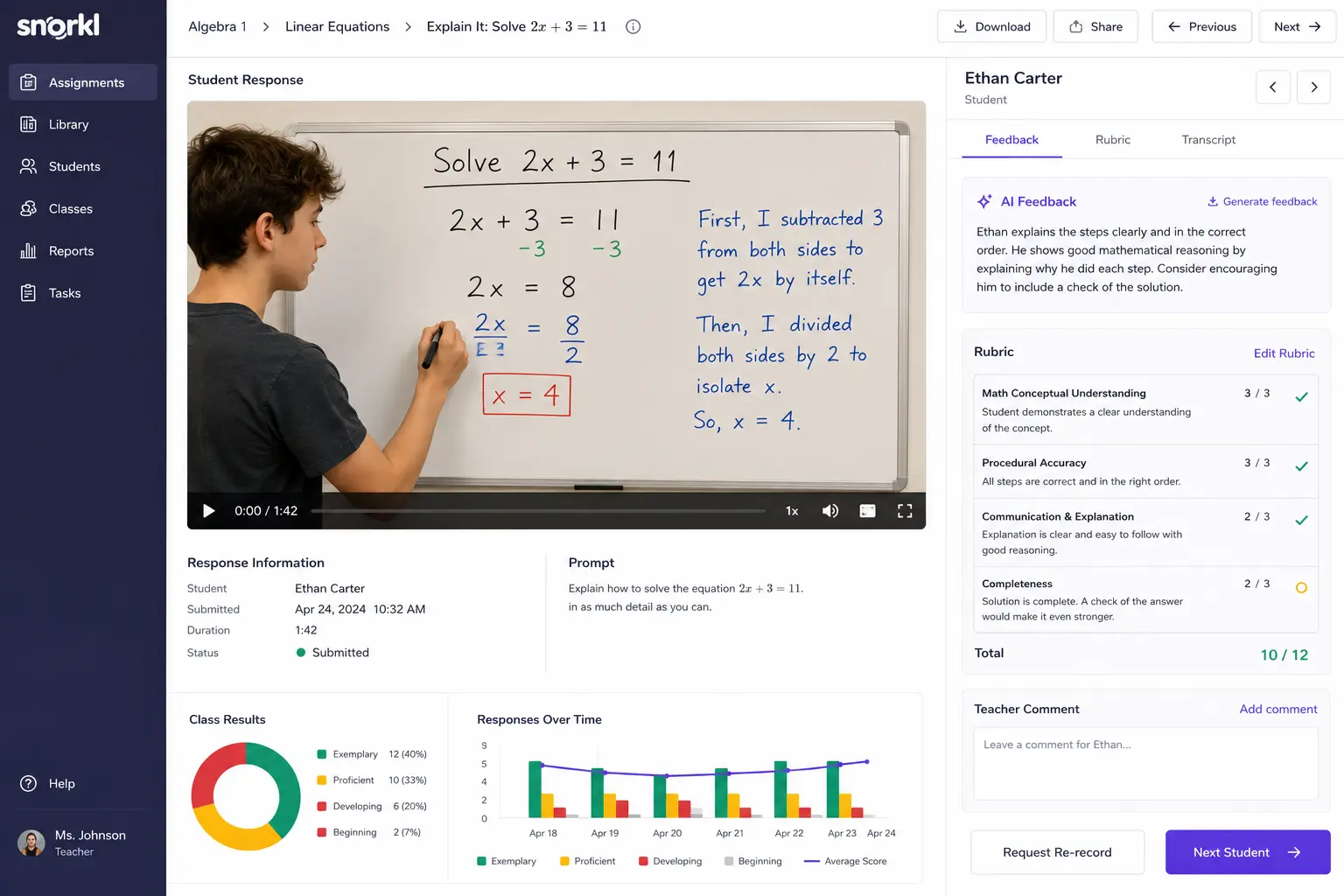
What makes Snorkl remarkable is that it works on non-written thinking — the kind that most AI tools completely ignore. A student explaining the steps of a math problem out loud while drawing each step is demonstrating deeper understanding than one who writes the steps from memory. Snorkl captures and evaluates this.
How it works:
Students open the link, speak their explanation into the microphone, and draw their answer on the digital whiteboard. Within approximately one minute, Snorkl generates three-part feedback for each student. Review all responses from your teacher dashboard — no manual grading required.
Why this matters specifically for math:
Traditional math assessment only captures the written answer. Snorkl captures the mathematical reasoning — the verbal explanation of process that reveals whether a student actually understands or is pattern-matching procedures without comprehension.
For teachers who want to assess mathematical thinking and not just procedural execution, Snorkl is unlike anything else in this guide.
Pricing: Free plan includes up to 20 active assignments. Paid plan removes limits.
7. Photomath — Best for Student Homework Support
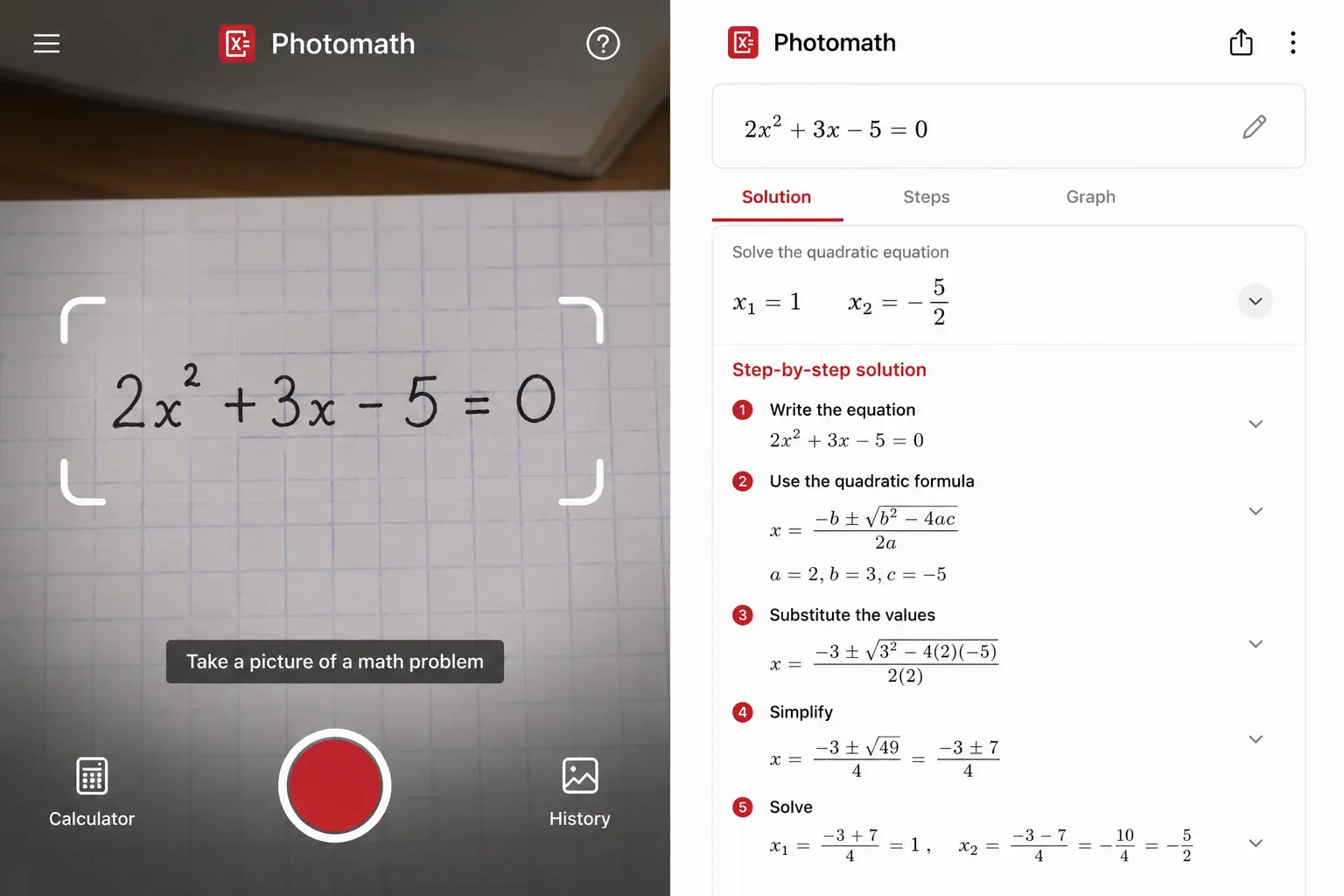
Photomath lets you point your phone camera at a math problem and get a step-by-step solution in seconds. It covers arithmetic, algebra, trigonometry, and basic calculus. The app breaks each problem into individual steps with plain-language explanations.
The honest teacher perspective on Photomath:
Photomath sits in the same gray area as other homework-support tools. Used by a student who wants to understand a process they got wrong — genuinely educational. Used to copy answers without reading the steps — counterproductive.
The most effective approach for math teachers in 2026 is to acknowledge that students have Photomath and design assignments that make it useless for cheating — multi-step problems requiring written justification, problems with specific class context, oral explanation requirements, and in-class assessments.
Best teacher use: Recommend Photomath explicitly for homework support — check your work, not copy answers — and design assessments that cannot be solved by photographing the problem.
Pricing: Free for basic features. Photomath Plus at ~$9.99/month for detailed explanations.
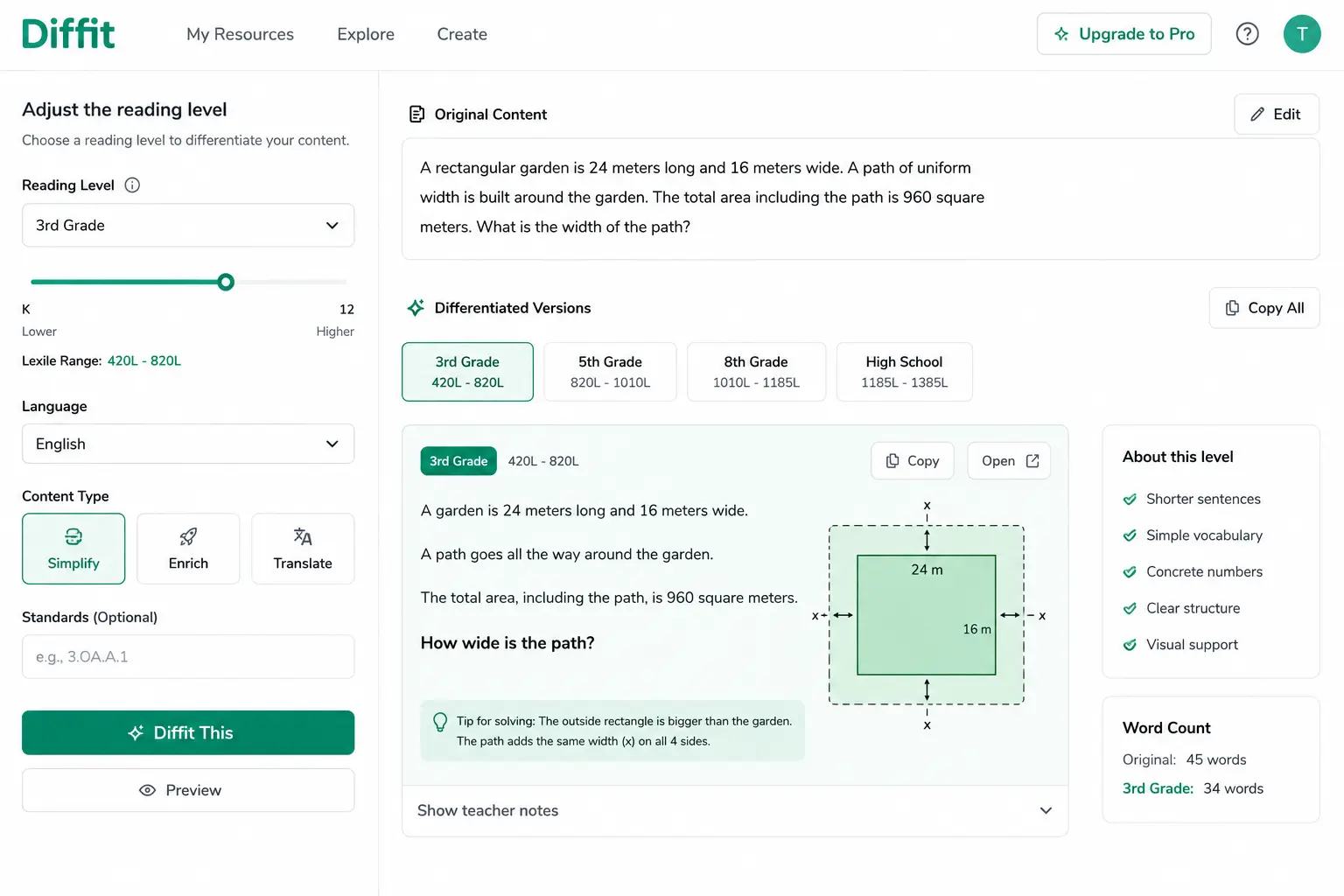
8. Diffit — Best for Math Word Problem Differentiation
Diffit is primarily known as a reading differentiation tool — but it has a specific and underappreciated use for math teachers.
Word problems are often reading problems. A student who can solve 3x + 7 = 22 algebraically may fail the same problem when embedded in a 6th-grade-level paragraph. Diffit levels the text surrounding math problems, making mathematical content accessible to students with varying reading abilities.
How math teachers use Diffit:
- Paste a complex math word problem → get simplified versions at multiple reading levels
- Adapt textbook word problems for ELL students and struggling readers
- Generate vocabulary support for math terminology students encounter in word problems
- Create modified versions of the same problem for IEP accommodations
Critical honest limitation: Diffit does not generate math problems — it only adapts the text around existing mathematical content. Use it for word problem accessibility, not for generating new problem sets.
Read our full Diffit review for complete details.
Pricing: Free plan available.
The Most Important Rule for AI in Math Teaching
This deserves its own section because it is the most common mistake math teachers make with AI tools.
Always verify AI-generated math before using it with students.
AI math tools make mistakes. General AI models produce false answers. Treat AI as support, not a replacement for practice and problem solving.
The specific failure modes to check:
- Answer accuracy — Does the AI-generated answer match what you get when you solve it yourself?
- Step accuracy — Are the intermediate steps mathematically correct, or does the AI skip steps or make errors mid-procedure?
- Problem feasibility — Does the word problem use realistic numbers? AI sometimes generates problems with impossible values.
- Standards alignment — Does the cited standard actually exist and match the content?
A two-minute verification of every AI-generated problem set is non-negotiable for math teachers. This is faster than writing problems from scratch — just not skippable.
My Recommended AI Stack for Math Teachers
You do not need all eight tools. Here is the practical math teacher stack organized by use case:
Lesson planning and content creation:
→ MagicSchool AI — spiral review, word problems, rubrics, differentiation
Student visualization and exploration:
→ Desmos — graphing and function exploration
→ GeoGebra — geometry and dynamic math
Student tutoring and practice:
→ Khan Academy + Khanmigo — mastery-based practice with Socratic AI tutoring
Math reasoning assessment:
→ Snorkl — verbal and visual explanation capture
Grading at scale:
→ Gradescope — handwritten math grading with AI grouping
Word problem accessibility:
→ Diffit — reading level adaptation for word problems
Total personal teacher cost: $0
All tools in this stack have free plans that cover the core use cases for individual classroom teachers.
What AI Still Cannot Do for Math Teachers
No AI tool in 2026 can:
Diagnose specific conceptual misconceptions in real time. AI can identify that a student got a problem wrong. It cannot reliably identify why — whether the error comes from a procedural slip, a conceptual misunderstanding, or a reading comprehension issue with the word problem. That diagnostic judgment is still yours.
Guarantee mathematical accuracy. For symbolic computation specifically, Wolfram Alpha remains more reliable than any LLM. For teachers who need computational certainty — use Wolfram Alpha or Desmos to verify, not AI text generators.
Replace mathematical intuition development. The experience of struggling productively with a hard problem — the cognitive work that builds mathematical fluency — cannot be shortcut by AI. Tools like Snorkl and Khanmigo support this process. Tools that give direct answers undermine it.
Mistakes Math Teachers Make with AI
Distributing AI-generated problems without solving them yourself first. The fastest way to lose student trust in your classroom is a worksheet with wrong answers. Solve every AI-generated problem before it reaches students.
Using answer-giving tools for student practice. Photomath and Wolfram Alpha are powerful — and completely undermine practice when students use them to copy answers. Be intentional about when you recommend these tools and what you ask students to do with them.
Expecting AI to handle notation correctly. Most AI text generators struggle with proper mathematical notation — fractions, exponents, radicals, and inequalities often render incorrectly in plain text output. Always check that mathematical expressions display correctly before printing or sharing.
Ignoring Desmos and GeoGebra because they are not “AI.” The best visualization tools for math teaching in 2026 are not primarily AI-powered. Desmos and GeoGebra save more teacher time and produce better student understanding than most AI tools on this list for geometry and graphing specifically.
Final Verdict
The best AI tools for math teachers in 2026 are the ones that handle math’s unique requirements — accuracy verification, visualization, Socratic tutoring, and differentiation — rather than generic AI tools awkwardly adapted for math contexts.
Start with MagicSchool AI for lesson planning and content creation. Add Desmos and GeoGebra for visualization. Add Khan Academy and Khanmigo for student practice and tutoring. Add Snorkl when you want to assess mathematical reasoning rather than just answers.
Verify everything before it reaches students. That one habit is worth more than any specific tool choice.
For more teacher AI strategies, check out our guides on the best AI tools for teachers in 2026, best AI quiz generators for classrooms, and AI tools for high school teachers.
Math teachers need a very different toolkit than English or science teachers — accuracy matters more than speed. That is why every recommendation in this guide is based on classroom usefulness, not marketing claims.